





 During the holidays, the most popular gifts given or received were mobile devices and according to Google’s Andy Rubin, there were 3.7 million Android devices activated between December 24 and 25.
But here’s the troubling fact: more kids and teenagers own mobile devices. According to Nielsen, a typical teenager generates an average of 3,417 messages per month. This means that kids and teens spend most of their time on their mobile devices and this concern parents. Parents always want what’s best for their kids and they would do everything they can, even invade their kids’ privacy, just to keep them safe.
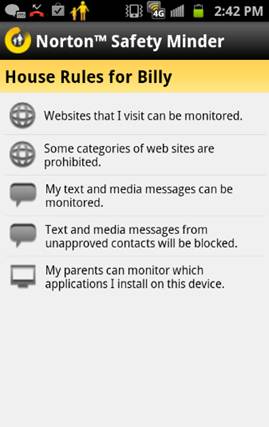
But privacy is important, we all know that, even kids value their privacy. And snooping parents will just result in angry teens. This is exactly what Norton aims to address when they launched their new, free app – Norton Safety Minder for Android, which allows parents to keep track of what their kids are doing on their mobile phones through Norton Online Family.
Parents can now monitor what their kids are up to on their phone as they do for their home PC, but the difference is that the kid knows what you are doing. How, you ask? Simple; when the Norton Safety Minder is running, an app icon will appear on their device. Norton hopes that this would encourage open conversation between parents and their kids about the importance of online safety.
A premier subscription to Norton Online Family allows access to the following Parental Control Features:
 It’s not just creepy guys calling or texting kids that parents should be worried about when talking about mobile devices. Aside from predators, kids and even adults, can become victims of malware through careless app downloads.
About a week ago, Symantec and Lookout Mobile Security published their findings regarding the Apperhand SDK found in some Android apps. Symantec stated that it’s malware but Lookout argued that it’s an aggressive adware, which, in the end, Symantec agreed with Lookout. But the point here is, people fall victim because of careless app downloading. It doesn’t follow that because an app is free you download it without thinking twice.
While there was much confusion over the Apperhand SDK, Symantec’s recently uncovered another wave of malicious apps, and these Trojans escape security software detection by mutating. As Android Market dangers continue to rise, more security services push their products to stay in line with increasingly competent malware makers.
About the same time as the Symantec-Lookout debate, McAfee launched the Mobile Security 2.0 for Android, BlackBerry and Symbian devices.
The security suite offers:
But keep this in mind: it doesn’t matter how many security app you on your mobile device if you would just keep downloading apps from untrustworthy sources as well as visiting unsecured sites. Be a real “smart”-phone owner. ;)
… We’d like to tell you about our mission and how you can help us fulfill it. SiliconANGLE Media Inc.’s business model is based on the intrinsic value of the content, not advertising. Unlike many online publications, we don’t have a paywall or run banner advertising, because we want to keep our journalism open, without influence or the need to chase traffic.The journalism, reporting and commentary on SiliconANGLE — along with live, unscripted video from our Silicon Valley studio and globe-trotting video teams at theCUBE — take a lot of hard work, time and money. Keeping the quality high requires the support of sponsors who are aligned with our vision of ad-free journalism content.
If you like the reporting, video interviews and other ad-free content here, please take a moment to check out a sample of the video content supported by our sponsors, tweet your support, and keep coming back to SiliconANGLE.






