



 NEWS
NEWS
NEWS
NEWS
NEWS

 Wi-Fi. Ever wondered why the hell it’s always so damn slow? Even when internet service providers promise you the earth – blazing fast speeds and the ability to download entire movies in seconds – unless your device is plugged directly into the router, you’re unlikely to see anything like that.
The truth is – and you won’t like to hear this, but – your Wi-Fi connection was never designed to go that fast. While service providers advertise lightning-fast connection speeds and even talk of gig-per-second speeds in the near future, these speeds are unlikely to ever come into fruition while we’re all so dependent on Wi-Fi. The advertising is one big lie, as a recent article in the WSJ points out – connection speeds advertised are almost always for wired devices only.
Wi-Fi Sucks
But why is it that Wi-Fi can’t handle the speeds we have been promised? Well, there are several factors that can drain your Wi-Fi bandwidth, though the three biggest hogs are your router, interference and the fact that you have so many different devices all competing for air time.
Perhaps the biggest problem is the router itself. This is where the Wi-Fi signal originates from, but while your service provider is selling you a 300Mbps signal, your router simply can’t handle it – it turns out that the vast majority of them can only handle speeds of 54 to 90 mbps, severely impacting your internet speed.
The second problem is interference – things like your microwave, or other routers in the vicinity, can weaken your own signal, slowing you down even more. Then of course, there are physical barriers too, such as walls, water (like, the water in the radiator) and distance.
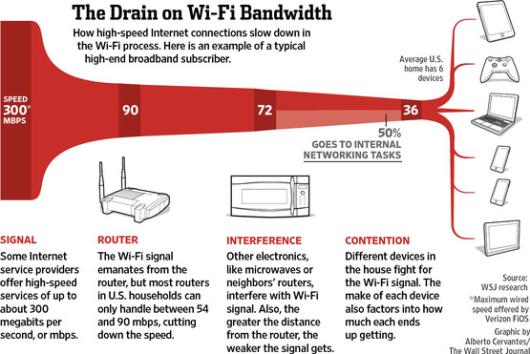
Image courtesy WSJ
Finally, the number of devices you have also plays a part. This won’t be a problem for everybody, but for the majority of Wi-Fi using households (who own an average of six connected devices) it is. Different devices essentially fight each other for what little Wi-Fi signal there is, meaning that your already significantly reduced bandwidth shrivels up into nothing when there’s an iPhone, an iPad, a laptop, a PC and a Smart TV all battling it out.
How To Give Your Wi-Fi a Kick Up The Ass
 So you can see, Wi-Fi really does suck, BUT, there are a few things you can do about it.
The first problem is the router itself. It’s worth checking the router’s eco settings. Sometimes, when they’re installed, many are set up in “Power saving mode” by default, and unless you know about it it’s unlikely that this has changed. This might be a commendable aim, but the truth is that bandwidth is reduced somewhat disproportionately as a result. If you value faster internet speeds over eco-friendliness, check the settings on your router and look for something called ‘Transmission power’ and see if it’s turned off. If it isn’t, then do so now – you might be pleasantly surprised by the results.
Geography is another issue. You need to find the best spot for your router, and make sure there’s minimal interference from other devices, walls, water and so on. You can use a Wi-Fi heatmapping tool such as Heatmapper or Netspot for Mac, which allow you to ‘map’ the Wi-Fi coverage in your home depending on where the router is. Don’t forget that distance is a big factor, so if your home is too big for effective coverage from your router, you may want to invest in a wireless repeater for $30-$100, which should give your signal a pretty big kick up the ass.
One final thing you can do is replace the antenna on your router. Weak antenna design is one of the biggest causes of packet loss – luckily for you, it’s possible to buy something far more powerful. Depending on how your home is set up and how many devices there are, you can choose from a directional antenna (one that points the signal in one direction), or an omnidirectional antenna (which scatters the signal in all directions).
… We’d like to tell you about our mission and how you can help us fulfill it. SiliconANGLE Media Inc.’s business model is based on the intrinsic value of the content, not advertising. Unlike many online publications, we don’t have a paywall or run banner advertising, because we want to keep our journalism open, without influence or the need to chase traffic.The journalism, reporting and commentary on SiliconANGLE — along with live, unscripted video from our Silicon Valley studio and globe-trotting video teams at theCUBE — take a lot of hard work, time and money. Keeping the quality high requires the support of sponsors who are aligned with our vision of ad-free journalism content.
If you like the reporting, video interviews and other ad-free content here, please take a moment to check out a sample of the video content supported by our sponsors, tweet your support, and keep coming back to SiliconANGLE.






