





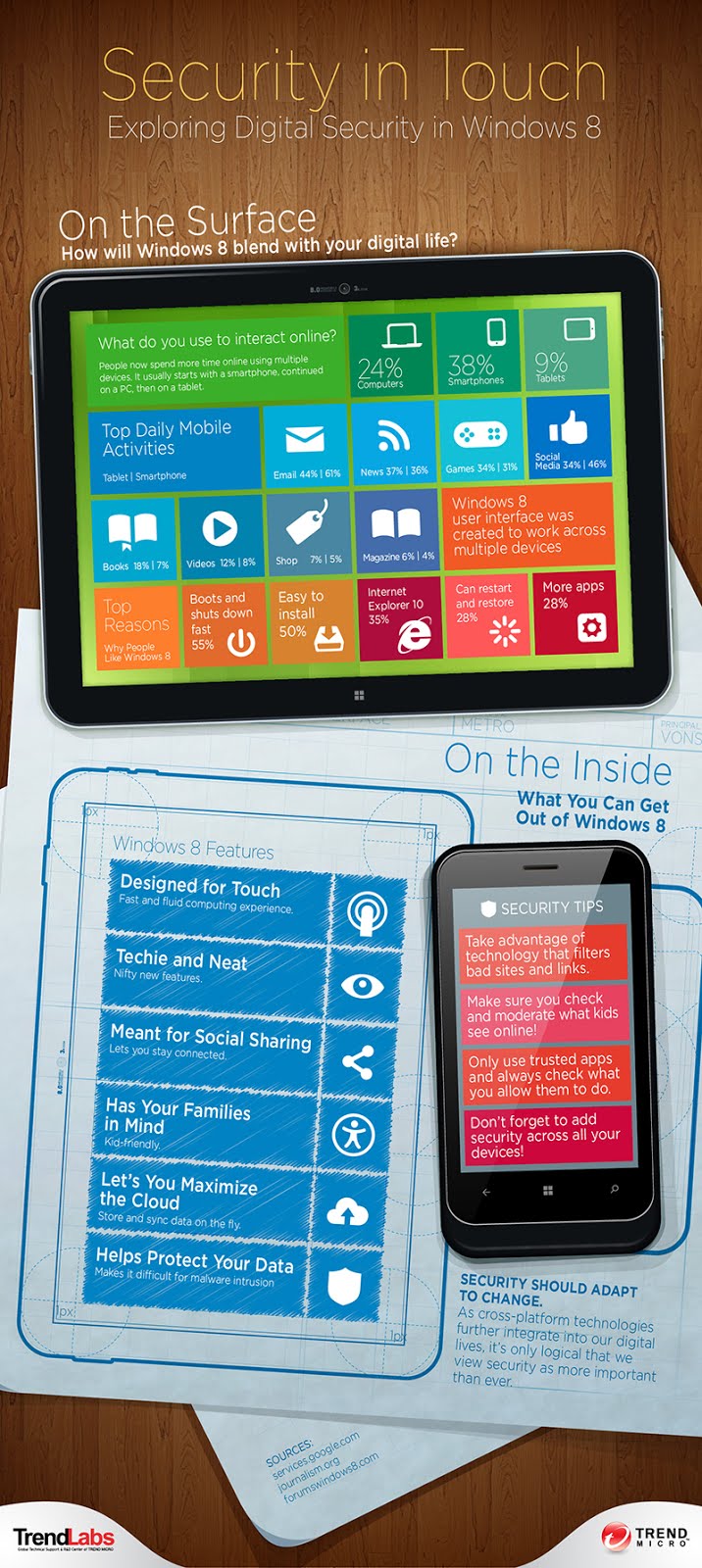
According to the infographic, though people tend to shift from smartphone to PC to tablets, 38 percent are more inclined to use their smartphones predominantly. This may be due to the fact that it’s the most mobile of all devices – it’s not a hassle bringing your smartphone everywhere and you can virtually do everything on a smartphone. For checking or sending e-mails the smartphone ranks higher than a tablet at 61 percent, but for entertainment purposes, the tablet is the choice of consumers with reading news at 37 percent, playing games at 34 percent, reading books at 18 percent, watching videos at 12 percent, shopping at 7 percent and reading magazines at 6 percent. But accessing social media, like updating Facebook status or tweeting or posting on Instagram is best enjoyed by consumers on their smartphones at 46 percent.
As the convergence of these mobile devices continue to grow, we can’t ignore the fact that security is still the number one issue when using any computing device. Consumers want to be able to shift from using one device to another without worrying about the security of using mobile devices, worrying about if hackers could easily infiltrate their personal space, or if downloading an app could cause their phone bill to skyrocket. And this concern is what Microsoft addressed with the Windows 8 platform.
Microsoft’s Windows 8 platform has attracted a lot of attention, some good, some bad. Though a lot of early adopters are quite pleased with the new OS, some are still doubtful if consumers would be willing to trade their old Windows 7 OS for the Windows 8 which is suited for touchscreen devices. If the tiles and the the new interface doesn’t reel consumers in, maybe its security would.
“Microsoft took a leap in Windows 8. It wouldn’t be a surprise if more people start to adopt this new OS. Whether they do or not, it pays to be prepared. As threats leveraging Windows 8 start to appear, users are called to reinforce their knowledge of common tricks employed. In an age of multi-platform technology like Windows 8, investing in specialized security ensures full enjoyment,” wrote Rowena Diocton, TrendMicro’s Technical Communications.
You see, Windows 8 has lots of new security features such as the native anti-malware Windows Defender, a SmartScreen filter that fights off social engineering tactics online, and the Windows Store had been greatly filtered to have only apps that were approved and tested to prevent malware-laced apps from being sold or downloaded by consumers. And last but definitely not the least, the Secure Boot and Early Launch Antimalware (ELAM) driver support for Windows 8 prevents low-level malware from loading on system startup.
… We’d like to tell you about our mission and how you can help us fulfill it. SiliconANGLE Media Inc.’s business model is based on the intrinsic value of the content, not advertising. Unlike many online publications, we don’t have a paywall or run banner advertising, because we want to keep our journalism open, without influence or the need to chase traffic.The journalism, reporting and commentary on SiliconANGLE — along with live, unscripted video from our Silicon Valley studio and globe-trotting video teams at theCUBE — take a lot of hard work, time and money. Keeping the quality high requires the support of sponsors who are aligned with our vision of ad-free journalism content.
If you like the reporting, video interviews and other ad-free content here, please take a moment to check out a sample of the video content supported by our sponsors, tweet your support, and keep coming back to SiliconANGLE.






