





 Hundreds of photos and videos. Thousands of songs. Documents that you have been saving for so long just because you can. All of them gone forever, because you failed to backup your computer.
Reality check, computer hard drives aren’t immortal nor indestructible no matter how much it cost. Sure, there’s always external hard drives to backup their files just in case the built-in computer hard drive fails in the future. Unfortunately, these external hard drives are also not immortal nor indestructible.
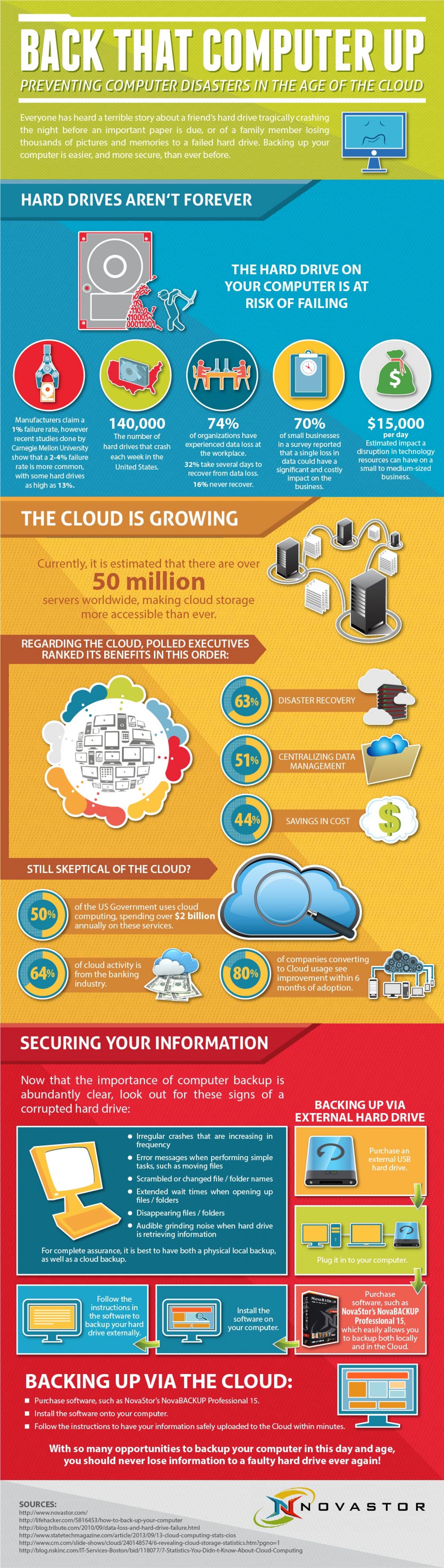
In an infographic created by Novastor, it was revealed that in the US, over 140,000 hard drives crash per week. About 74 percent of organizations have suffered data loss because of faulty hard drives. Some 32 percent are able to recover lost data several days after the crash, while 16 percent never recover their lost data. Business owners know how important data is, and losing them could cost a small or medium business about $15,000 per day.
.
Because of the 2-4 percent failure rate of hard drives, some are now more open to the use of cloud storage to backup their files.
According to NovaStor, the main reasons executives are choosing cloud storage because of faster disaster recovery, the centralization of data management, and to save costs.
If you’re still skeptical regarding cloud storage, this information may put your mind at ease: about 80 percent of companies that transitioned to using cloud storage saw improvement in just six months; 65 percent of cloud computing activities are bank related; and 50 percent of government agencies use cloud computing.
Wikibon’s Stu Miniman advices companies to make the first move into the cloud not only to protect their data, but also to save on costs.
“If you haven’t taken that first step into the cloud, I think you [should] pick an application your environment – data protection is a good one, whether it be backup or replication from a disaster recovery standpoint – you pick one of those and start to give it a try. You not only try it from a technology aspect, but you also start looking at it from a financial aspect,” he says.
If you’re looking into backuping your files to the cloud but you’re not entirely sold on the whole idea of leaving everything in the cloud, NovaStor offers a way for you to backup on an external hard drive and the cloud at the same time using the NovaBACKUP Professional 15.
See how the major cloud services stack up here, where we compare Amazon, Google and a number of other popular clouds’ perks and downfalls.
… We’d like to tell you about our mission and how you can help us fulfill it. SiliconANGLE Media Inc.’s business model is based on the intrinsic value of the content, not advertising. Unlike many online publications, we don’t have a paywall or run banner advertising, because we want to keep our journalism open, without influence or the need to chase traffic.The journalism, reporting and commentary on SiliconANGLE — along with live, unscripted video from our Silicon Valley studio and globe-trotting video teams at theCUBE — take a lot of hard work, time and money. Keeping the quality high requires the support of sponsors who are aligned with our vision of ad-free journalism content.
If you like the reporting, video interviews and other ad-free content here, please take a moment to check out a sample of the video content supported by our sponsors, tweet your support, and keep coming back to SiliconANGLE.






