





 What’s in a name? There has been a lot of speculation as to why Microsoft jumped straight to Windows 10 and leap-frogged the number 9, but Terry Myerson, Microsoft’s executive vice president of Operating Systems, at a media briefing in 2014 shed some light when he said that although “the natural thing for us is to name it in the chronological sense,, it is the massive change in the new OS, a “new way of doing things,” that best symbolizes the number 10, and not 9, which, is just a little too close to 8, a number Microsoft may want to forget. So, how has Microsoft done things so differently this time?
Well, if you’re running Windows 7, Windows 8.1 and Windows Phone 8.1, you will receive the upgrade to Windows 10 at no cost. The free upgrade will be available for one year from when the new OS is commercially released sometime later this year. It was also reported in March 2015 that Redmond would be giving some slack to the many millions of users in China running pirated versions of Windows and “upgrading all qualified PCs, genuine and non-genuine.”
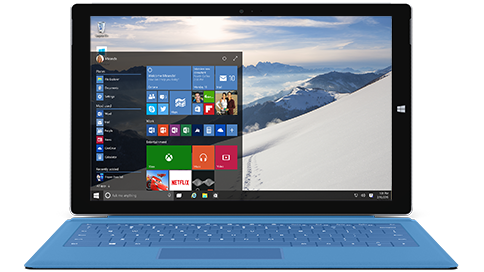
Most people will be pleased to know that the look will be much more similar to Windows 7’s Start Menu. The Start Menu can also be personalized in many different ways, including making it translucent, changing the color settings, or letting Windows automatically find the right color according to your wallpaper choice.
Tiles will appear next to the Start Menu. If you right click on an app in the Start Menu, you can pin it as a live tile, but you can move the tiles around by right clicking on them and then change the size of those tiles. You also have the choice to pin files and websites to the Start Menu.
Universal Apps means no more buying the same apps for a number of devices; one app works on all.
As we’ve reported from what we know about the Technical Preview, the start menu will scale to whatever device you are using by first detecting it using Continuum. If a mouse and keyboard is detected, it will use desktop mode, but if it recognizes a touchscreen device, it will boot into touch-friendly mode.
Multi-tasking has been made a little easier with the use of the Snap Assist feature to snap windows. This can be done with the mouse or done with the arrows keys on the keyboard, albeit slightly more difficult this way. Using the mouse to snap a window, just drag it onto the screen, either as the entire screen, half screen or part of a quadrant. You can also create a number of virtual desktops.
Microsoft’s new browser, Spartan, is a massive improvement on Internet Explorer, to say the least. It will work with the digital assistant, Cortana, so that searches will be anticipated and relevant information pertaining to your search will be brought up. We also like the annotation feature, which allows you to write and scrawl over webpages and then send them to other people by using Microsoft’s OneDrive Cloud storage.
With Windows 1o, you’ll be able to play your Xbox Live content on your PC and even play games against other live players whether they are using a PC or Xbox console. You can also snap screenshots of your games or record your actions in gameplay. The augmented reality headset HoloLens, which looks to be about to mount a challenge in the gaming space and could turn your living room into a 3D work space, is also a highly anticipated Windows 10 feature.
… We’d like to tell you about our mission and how you can help us fulfill it. SiliconANGLE Media Inc.’s business model is based on the intrinsic value of the content, not advertising. Unlike many online publications, we don’t have a paywall or run banner advertising, because we want to keep our journalism open, without influence or the need to chase traffic.The journalism, reporting and commentary on SiliconANGLE — along with live, unscripted video from our Silicon Valley studio and globe-trotting video teams at theCUBE — take a lot of hard work, time and money. Keeping the quality high requires the support of sponsors who are aligned with our vision of ad-free journalism content.
If you like the reporting, video interviews and other ad-free content here, please take a moment to check out a sample of the video content supported by our sponsors, tweet your support, and keep coming back to SiliconANGLE.






