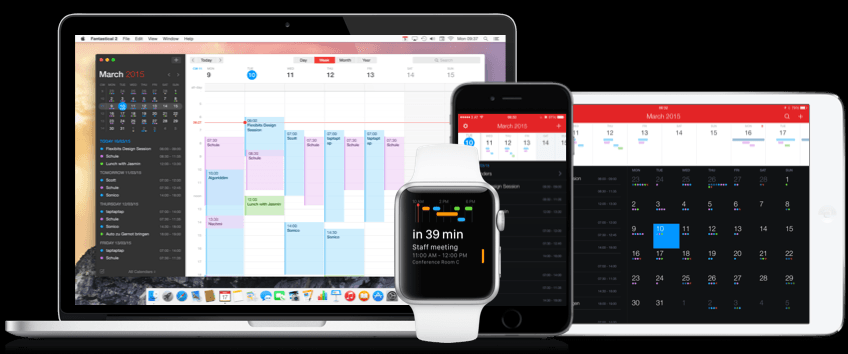







Popular calendar app, Fantastical for iPhone and Mac, has finally arrived on Apple Watch and it boasts some features not offered by the smartwatch or Apple’s own calendar app for Apple Watch. Flexbits, the company behind Fantastical, yesterday rolled out version 2.3 of the app, adding support for Apple Watch.
Fantastical 2 for Apple Watch shows the user a list of upcoming appointments, a list of Reminders, an easy-to-view daily schedule via a Glance, and brings the ability to add reminders and create events with Force Touch and dictation.
Why did Flexbits wait more than a month after the release of Apple Watch to launch its own app? Flexbits’ co-founder Michael Simmons explained the move to MacRumors:
[Flexbits] waited until the Apple Watch was released to begin developing Fantastical 2 for the wrist, in order to design an app with the best possible user experience. “I’m not going to make an Apple Watch app when I’ve never used one,” said Simmons. “I need to see it. You can’t solve a problem if you don’t know what the problem is.”
Using a Glance view, Fantastical for Apple Watch displays the day’s events in a timeline and provides an easy-to-view overview of a user’s upcoming appointments and commitments.
To drill down into timeline events, a user simply taps the timeline in the Glance view to access the full Fantastical app. This displays a complete list of scheduled events for the next two weeks – a notable difference from Apple’s native Calendar app that only displays events for one week.
Tapping a specific event pulls up more detailed information and to scroll through a list of events a user can use a finger or the Digital Crown.
The Apple Watch does not come with a Reminders app (users have to use the Reminders app on iPhone); however, using Fantastical Reminders feature, users can simply tap “Reminders” on the Watch to pull up a list of previously created reminders and check off completed items.
Using Force Touch and Apple Watch’s dictation feature, users can add reminders and events in Fantastical directly on the Watch.
Fantastical for Apple Watch can be tweaked according to user preferences via the iPhone app.
For iPhone users of Fantastical Apple Watch support is included free of charge, or if you do not already own the app, download Fantastical from iTunes for $4.99.
Support our mission to keep content open and free by engaging with theCUBE community. Join theCUBE’s Alumni Trust Network, where technology leaders connect, share intelligence and create opportunities.
Founded by tech visionaries John Furrier and Dave Vellante, SiliconANGLE Media has built a dynamic ecosystem of industry-leading digital media brands that reach 15+ million elite tech professionals. Our new proprietary theCUBE AI Video Cloud is breaking ground in audience interaction, leveraging theCUBEai.com neural network to help technology companies make data-driven decisions and stay at the forefront of industry conversations.





