



 NEWS
NEWS
NEWS
NEWS
NEWS

At the end of this month Microsoft will officially release Windows 10, but before that happens, Windows Insiders in the Fast ring can see a few more updates to the new OS as of now. At first, Build 10158 was released, which contained a bunch of new features, and then just a day after, Microsoft also released Build 10159.
Why two builds in such quick succession?
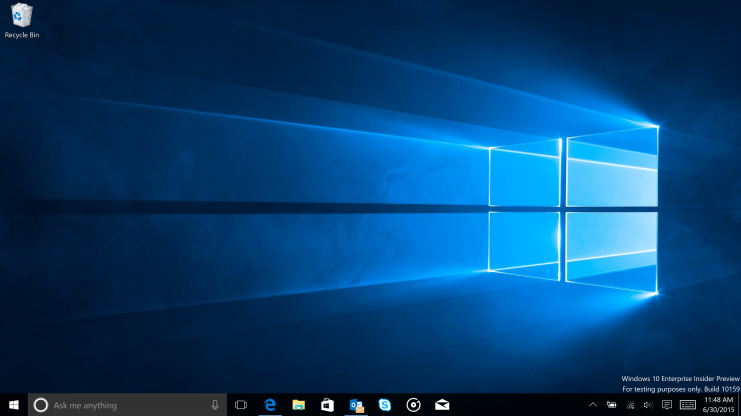
Microsoft explained in a blog post that all builds first have to be validated after engineers have been perfecting them in the internal ring. It turns out that Redmond had been working on both builds more or less back to back, but both passed the validation criteria at similar times. Usually, Microsoft would hold back on releasing the later build, but the company says there was one thing it thought people had to see.
“We thought that you’d want to see that one change,” said Microsoft excitedly. That change is a major thing, seeing as everyone is going to be looking at it for some time: the new default hero desktop image. Around 300 fixes were also included in the build.
As for the first build, of importance is the Edge browser that now has its branding in the operating system. And there are myriad new features. These include a new Home button; an import facility from other browsers; password management support for websites; a dark theme and new options in the Start page.
Microsoft’s Siri-like AI Cortana has also seen improvements, including Cortana integration with Microsoft’s Office 365, doing such things as telling you to get yourself to the meeting you’re already late to. Other improvements consist of the voice assistant tracking your flights. Cortana also now helps you send emails.
In a blog post Gabe Aul, general manager for the Operating Systems Group at Microsoft, wrote, “Just say everything at once, such as who you want to email (you can send to multiple people), the subject of the e-mail, and what you want your email to say and that’s it.”
Smaller improvements to the build are updates to the Photos app that now supports animated GIFs, as well as a new snipping tool.
Remember that if you are a previewer and opt-in for updates in the future, you can stay in the program after the official release. This is probably only the best tactic if you can’t update for free.
… We’d like to tell you about our mission and how you can help us fulfill it. SiliconANGLE Media Inc.’s business model is based on the intrinsic value of the content, not advertising. Unlike many online publications, we don’t have a paywall or run banner advertising, because we want to keep our journalism open, without influence or the need to chase traffic.The journalism, reporting and commentary on SiliconANGLE — along with live, unscripted video from our Silicon Valley studio and globe-trotting video teams at theCUBE — take a lot of hard work, time and money. Keeping the quality high requires the support of sponsors who are aligned with our vision of ad-free journalism content.
If you like the reporting, video interviews and other ad-free content here, please take a moment to check out a sample of the video content supported by our sponsors, tweet your support, and keep coming back to SiliconANGLE.






