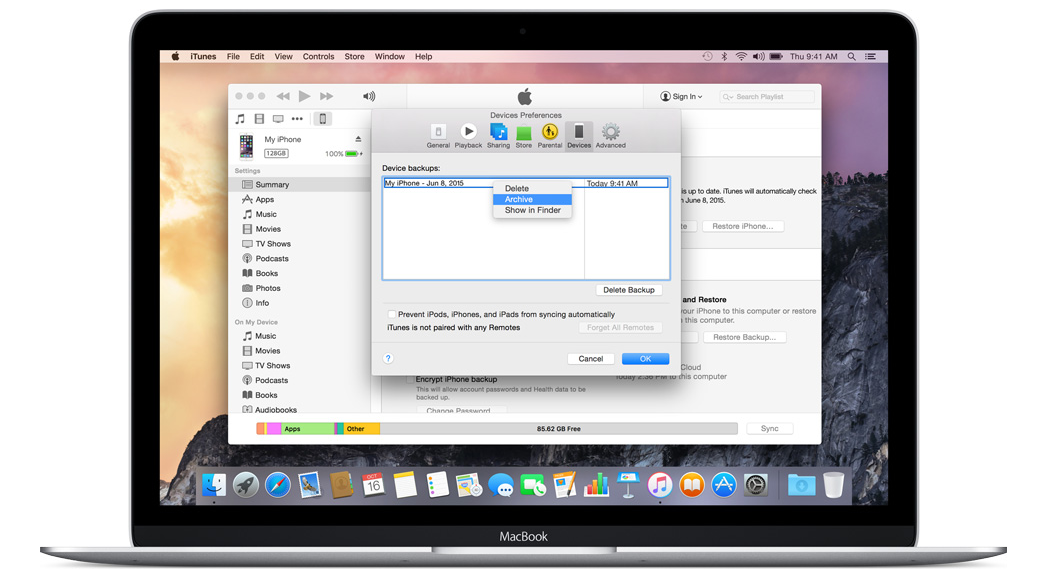







Apple released the iOS 9 public beta on Thursday. Before you hurry to install it, you should backup your iOS device using iTunes. Why back up? Beta software is bound to be buggy and may suffer from performance issues. If you find you cannot live with the iOS 9 beta and want to downgrade to a current, stable version of iOS, you’ll need a working backup to restore from.
You cannot restore your iOS device from a backup in iCloud, so when you create a backup using iTunes you must also archive it to create a local copy.
Here is how you archive an iOS backup using iTunes:
This will create a local archived copy of the backup, from which you can restore your device should you need to.
With an archived backup done, you can install the iOS 9 public beta.
Support our mission to keep content open and free by engaging with theCUBE community. Join theCUBE’s Alumni Trust Network, where technology leaders connect, share intelligence and create opportunities.
Founded by tech visionaries John Furrier and Dave Vellante, SiliconANGLE Media has built a dynamic ecosystem of industry-leading digital media brands that reach 15+ million elite tech professionals. Our new proprietary theCUBE AI Video Cloud is breaking ground in audience interaction, leveraging theCUBEai.com neural network to help technology companies make data-driven decisions and stay at the forefront of industry conversations.





