







On Tuesday Google introduced a new Information Rights Management (IRM) feature to Google Drive, the company’s file storage and synchronization service that lets users store files in the cloud, share files, and edit documents, spreadsheets, and presentations with collaborators. (via VentureBeat)
With IRM, Google gives Drive users control over the documents and content shared with others by allowing them to disable downloading, printing and copying of shared documents via the advanced sharing menu.
Google says IRM is available for any file stored or created in Google Drive. That means it is not limited to documents, spreadsheets and presentations created with Google Docs, but also for PDF and other file formats.
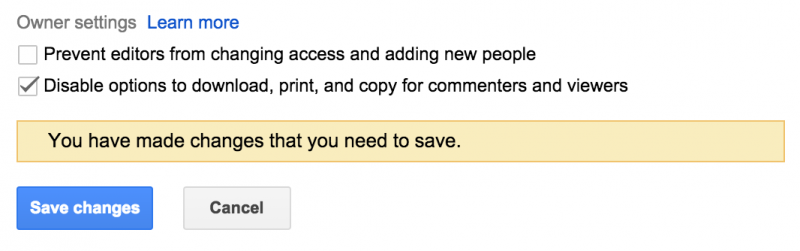
Users sharing a file that contains confidential or sensitive information not meant to be shared beyond the initial person it is shared with can enable the feature by opening the sharing dialogue from any document in Google Drive on the web and clicking on “Advanced” in the bottom right-hand corner of the box.
Next, check the ‘’Disable options to download, print, and copy for commenters and viewers’’ box and click “Save changes.”
Now the recipient(s) will not be able to download, print or copy the document.
Google has also made IRM available as part of the Google Drive API for developers.
The feature does have a few restrictions and caveats:
A word of caution, IRM is not intended to be a full-blown security and privacy feature for your sensitive files. If you take the risk of sharing a file with someone, this feature will merely remind them that they are not supposed to share the file with others.
Nothing prevents users from taking a screenshot of your document or even reproducing it manually.
Support our mission to keep content open and free by engaging with theCUBE community. Join theCUBE’s Alumni Trust Network, where technology leaders connect, share intelligence and create opportunities.
Founded by tech visionaries John Furrier and Dave Vellante, SiliconANGLE Media has built a dynamic ecosystem of industry-leading digital media brands that reach 15+ million elite tech professionals. Our new proprietary theCUBE AI Video Cloud is breaking ground in audience interaction, leveraging theCUBEai.com neural network to help technology companies make data-driven decisions and stay at the forefront of industry conversations.





