



 NEWS
NEWS
NEWS
NEWS
NEWS

As well as giving us a beta version of Windows 10 for mobile (Windows 10 Mobile Insider Preview Build 10581) this week, Microsoft has also just released a new build for Windows 10 on PC (Preview Build 10576) for Windows Insiders on the Fast Ring. Besides fixing a load of bugs and attending to a myriad of known issues, the new build has some enticing new features.
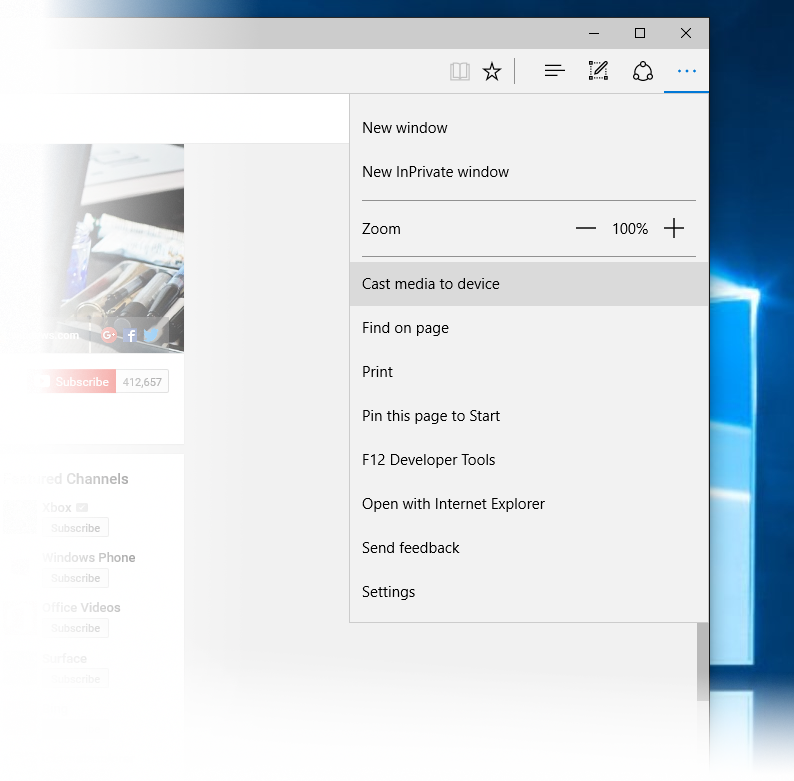
The best of these features is Media Casting in Microsoft Edge, in which video, picture, and audio content can be cast to any Miracast- and DLNA-enabled device on a user’s network. Microsoft gave a list of examples of how this can be used:
Visit YouTube in Edge and go to the menu. From there Microsoft says, “Select ‘Cast media to device’ and select the Miracast or DLNA device you want to cast to.” The same can be done with Facebook photos. Just go to the album using Edge, click on cast media to device, and navigate through the album. This can be used in Pandora, says Microsoft, for casting music to your selected device. Projecting content from Netflix and Hulu is not supported, though.
Media casting is the best bit about the new build, but a another useful feature has been added to Edge. Now when reading PDFs in the new browser you can highlight text, right click, and ask Cortana for information relating to that text.
Some changes have been made to the Xbox beta app for Windows 10, which includes the ability to find friends from Facebook when using Xbox Live so you can chat and share content. Voice recording has been added to Game DVR, while the Store in the Xbox beta app offers new purchases and promotions.
The new features will eventually reach all Windows 10 users when Microsoft rolls-out its Threshold 2 update starting sometime at the beginning of November.
… We’d like to tell you about our mission and how you can help us fulfill it. SiliconANGLE Media Inc.’s business model is based on the intrinsic value of the content, not advertising. Unlike many online publications, we don’t have a paywall or run banner advertising, because we want to keep our journalism open, without influence or the need to chase traffic.The journalism, reporting and commentary on SiliconANGLE — along with live, unscripted video from our Silicon Valley studio and globe-trotting video teams at theCUBE — take a lot of hard work, time and money. Keeping the quality high requires the support of sponsors who are aligned with our vision of ad-free journalism content.
If you like the reporting, video interviews and other ad-free content here, please take a moment to check out a sample of the video content supported by our sponsors, tweet your support, and keep coming back to SiliconANGLE.






