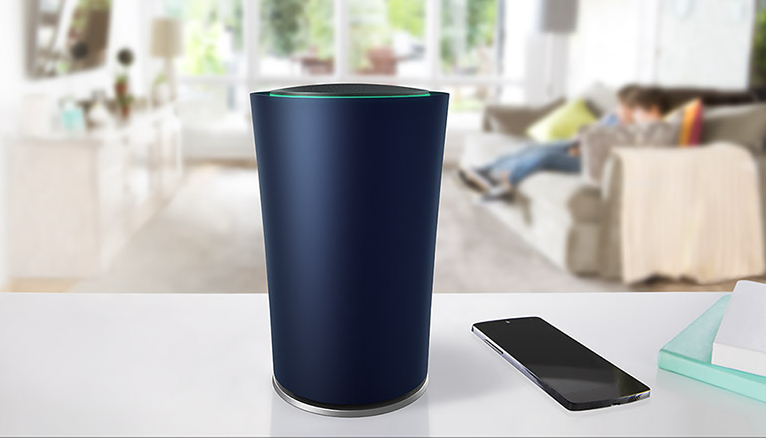







Google introduced its OnHub smart wireless router — a router that delivers fast Wi-Fi, easy setup, and software that regularly updates itself — in August last year . In addition, OnHub provides support for over 100 devices at one time, including lights, thermostats, speakers, etc. In the months that followed, OnHub was updated with Guest Wi-Fi, automatic band steering, and the On.Here interface.
Now OnHub becomes the first router to support IFTTT, allowing you to set up triggers when certain devices connect to the OnHub network. With support for automated Recipes from IFTTT, OnHub owners will be able to connect to the 300-plus programs and apps supported by IFTTT.
From receiving automated notifications when loved ones connect to the OnHub network to switching on lights or the thermostat when you arrive home, there is a wide range of IFTTT Recipes that can help you automate your life.
We look at a small selection of these Recipes, how you can start adding them to your OnHub and where you can buy an OnHub if the new IFTTT feature has sparked your interest.
| IF… | THEN… |
| a (specified) device joins the OnHub network | send a Gmail message.(when your kids get home from school and connect to the network, you will be alerted that they are home) |
| a device [connects to] [disconnects from] the network | turn [on] [off] your Philips Hue lights. |
| a Chromebook connects to the network | turn on WeMo Switch. |
| a device connects to the network | set Nest thermostat temperature. |
| at a select time every day | prioritize a certain device. |
| a device connects to the network | play Stone Cold Steve Austin entrance music. |
| new sound or motion | prioritize Nest Cam. |
| BMW arriving soon | prioritize a certain device. |
| a device connects to the network | set the temperature of the GE water heater. |
| your favorite team’s game starts on ESPN | prioritize a certain device. |
To get started creating Recipes, register and log in at IFTTT > connect to the OnHub channel > start adding your Recipes.
Recipes are split between Triggers and Actions. For Triggers, the Trigger will fire every time a device connects, or disconnects, to OnHub. For Actions, the Action will prioritize a device for one hour on the OnHub network.
Check out the various OnHub and IFTTT Recipes in action in the video below.
If the introduction of IFTTT has inspired you to give the OnHub a try, you can buy it from a variety of stores, including TP-Link Store, Best Buy, Frys.com, Micro Center, Newegg and Walmart for $199.99. While Amazon has the OnHub on sale for $182.50.
Support our mission to keep content open and free by engaging with theCUBE community. Join theCUBE’s Alumni Trust Network, where technology leaders connect, share intelligence and create opportunities.
Founded by tech visionaries John Furrier and Dave Vellante, SiliconANGLE Media has built a dynamic ecosystem of industry-leading digital media brands that reach 15+ million elite tech professionals. Our new proprietary theCUBE AI Video Cloud is breaking ground in audience interaction, leveraging theCUBEai.com neural network to help technology companies make data-driven decisions and stay at the forefront of industry conversations.





