






If you are eager to try out the functionality of Alexa, but are unsure about handing over $180 for the Amazon Echo or $80 for the Echo Dot, then there is a (much) cheaper alternative. The new Lexi app, available for iOS, allows you to enjoy the Alexa functionality without the need to buy the hardware. All that is required to use the Lexi app is an Amazon account.
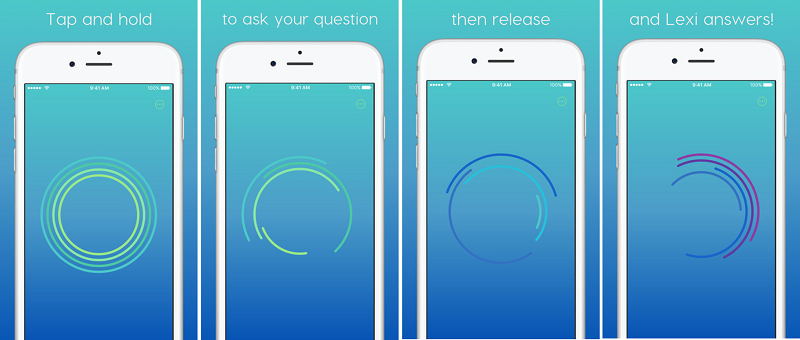
We look at how to use the Lexi app, what it can and can’t do for you and how it differs from Siri.
Tip: The default location for Alexa is Seattle, so Lexi will think you are based there. To change your location, download the Amazon Alexa app, click Settings > tap on your Lexi device > update your zip code.
The Lexi app can do practically everything the Echo can do, well almost.
Lexi can give you the latest headlines, what the weather is like and when your favorite sport’s team is playing their next game. Add your home and work addresses into the Alexa app and get Lexi to update you on the traffic conditions.
You can ask Lexi for the best taco shop in your neighborhood, or get directions to the closest pharmacy together with the time they close. Using Lexi on your iOS device you can reorder Prime eligible products from Amazon. Lexi also gives you the ability to control your smart home devices from anywhere. Simply add your smart home devices using the Alexa app and you will be able to control your lights, thermostat and more using the Lexi app.
What the Lexi app lacks at this stage is integration with Alexa’s book and music services. So if you are adamant about streaming music from the likes of Amazon Prime Music, you will need to pick up an Echo for $180.
Plenty of the functionality in the Lexi app is similar to Siri. However, where it differs is that the Lexi app will allow you to reorder products from Amazon and control your smart home devices that are not compatible with HomeKit.
While the Lexi app may not have all the functionality of an Echo or Echo Dot it definitely will allow you to enjoy a bulk of the Alexa functionality at a much lower price.
Check out how the Lexi app works in the video below.
Support our mission to keep content open and free by engaging with theCUBE community. Join theCUBE’s Alumni Trust Network, where technology leaders connect, share intelligence and create opportunities.
Founded by tech visionaries John Furrier and Dave Vellante, SiliconANGLE Media has built a dynamic ecosystem of industry-leading digital media brands that reach 15+ million elite tech professionals. Our new proprietary theCUBE AI Video Cloud is breaking ground in audience interaction, leveraging theCUBEai.com neural network to help technology companies make data-driven decisions and stay at the forefront of industry conversations.





