



 NEWS
NEWS
NEWS
NEWS
NEWS

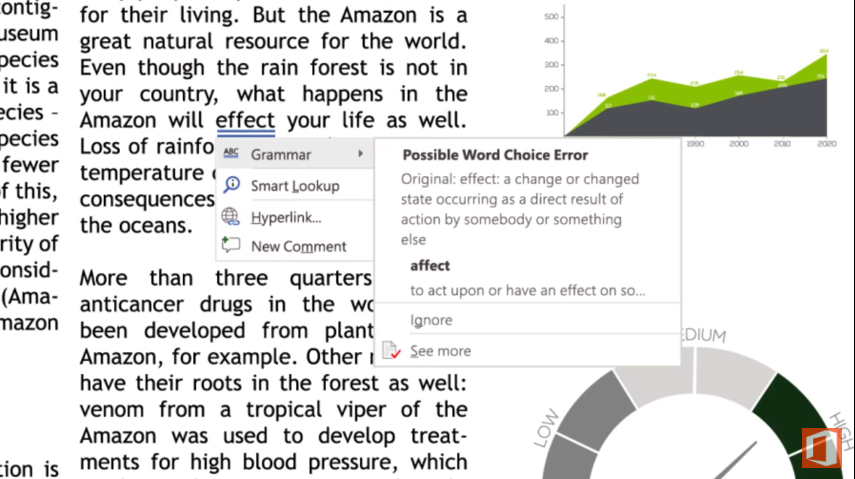
Microsoft Corp. is gearing up to release a major update for its Office 365 productivity suite. The biggest changes are coming to Word, which is set to receive two new editing features that the company says employ artificial intelligence to streamline the writing process.
The first new addition is called Editor for Word and promises to extend the application’s built-in spellchecker with automatic linguistic recommendations. It can flag subtle grammatical errors that currently go undetected, display word definitions to help explain each mistake and even provide tips for improving readability. This means that if a worker uses an overly complicated phrase like “the majority of” in a sentence, a tooltip will appear with a recommendation to use a simpler expression like “most of.” Microsoft says that the suggestions are generated in the cloud by a combination of machine learning and natural language processing algorithms.
The decision to handle the task in its own data centers should give Microsoft a lot valuable insight into users’ most common mistakes. The company plans on using the information to enhance the tool’s linguistic prowess over time and improve the accuracy of suggestions. Redmond also intends to upgrade the visual cueing system further down the line to help workers easily distinguish styling issues from more routine syntax errors. And somewhere along the way, the company will roll out Researcher for Word, the other major addition that is included in the update.
The tool takes the form of a sleek sidebar where users can search the web for information related to their work without the hassle of opening a browser in a new window. It uses Bing to pull content from scientific publications, university websites and other creditable sources that Redmond deemed reliable enough for use in academic or professional settings. A complementary citation then makes it possible to quickly pull quotes into a document and have an inline reference automatically added to the bottom of their documents.
The new Word tools will be joined by a Gmail-inspired sorting feature for Outlook that was previously only available on mobile devices and a visual navigation interface designed to make PowerPoint slideshows more accessible. The latter addition provides the ability to display multiple miniaturized slides in the same view, functionality that Microsoft hopes will make it easier for users to manage their content during presentations.
The new features will start rolling out later this month.
… We’d like to tell you about our mission and how you can help us fulfill it. SiliconANGLE Media Inc.’s business model is based on the intrinsic value of the content, not advertising. Unlike many online publications, we don’t have a paywall or run banner advertising, because we want to keep our journalism open, without influence or the need to chase traffic.The journalism, reporting and commentary on SiliconANGLE — along with live, unscripted video from our Silicon Valley studio and globe-trotting video teams at theCUBE — take a lot of hard work, time and money. Keeping the quality high requires the support of sponsors who are aligned with our vision of ad-free journalism content.
If you like the reporting, video interviews and other ad-free content here, please take a moment to check out a sample of the video content supported by our sponsors, tweet your support, and keep coming back to SiliconANGLE.






