






Slack Technologies Inc. has announced another key integration into its enterprise chat app with Salesforce.com, allowing businesses to easily share employee conversations and sales account information across the two platforms.
Since launching in 2014, Slack has grown to 3 million users of which 930,000 are paying users. The popular communication service does, however, face competition from the likes of Microsoft Corp.’s Yammer, which is now downsizing its enterprise tier, with the company also reportedly working on Skype Teams to take on Slack. If rumors are to be believed, next month will also see the launch of Facebook at Work with a pricing method that will put it on par with Slack.
Salesforce has been on a big acquisition run this year, which includes collaboration app Quip Inc. in August, with rumors making the rounds that it is one of the companies that has its sights on a Twitter acquisition.
The news of Salesforce’s integration with Slack comes less than a week after Cisco Systems Inc. announced the integration of its Spark team communications and WebEx online meeting services into Salesforce’s cloud.
Here’s a look at the new Salesforce integrations coming to Slack over the next month:
Once you install the Salesforce integration for your Slack team you can search directly within Slack for any of your Salesforce customers, contacts, leads or opportunities.
Enter the /salesforce command, together with your search term, in the message box and click send. The Slack search will provide you with the top three results. Click the relevant result to expand it, showing you the basic account details. Alternatively, you can also view it in Salesforce.
Note: The /salesforce command together with the search results will only be visible to you and not your entire team.
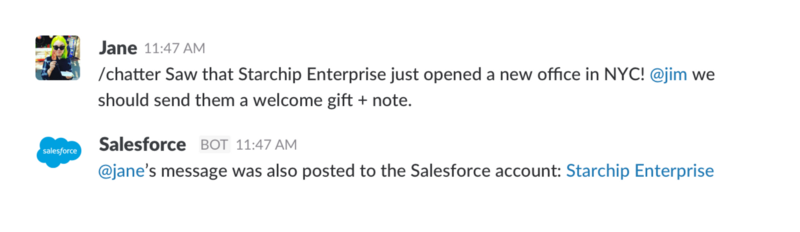
Slack and Chatter, Salesforce’s own messaging app, can now remain in sync by using specific slash commands.
In Slack: Type the /chatter command to send updates to Chatter.
In Chatter: Type the /slack command to send updates to Slack.
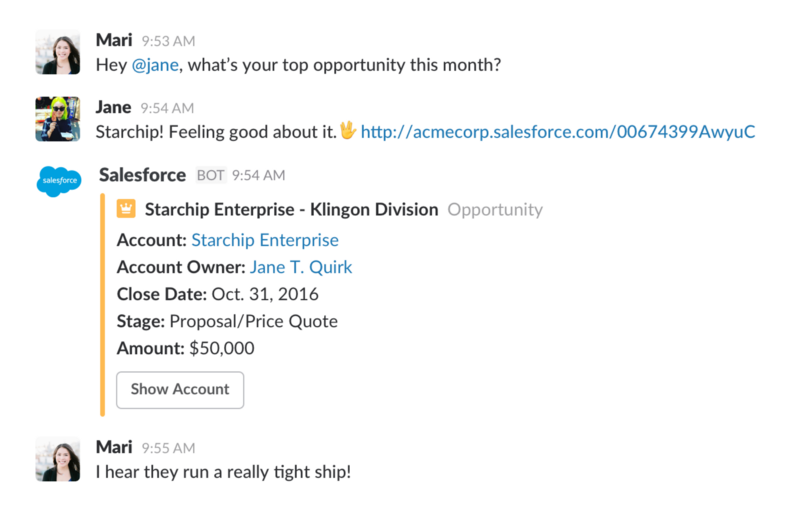
When discussing a Salesforce record in Slack, simply copy and paste the link. Thanks to the Salesforce integration, Slack will expand the link automatically with additional details from Salesforce, allowing you to share the information with your team.
The integration also allows you to create a new Slack channel, or connect with an existing one, for each Salesforce customer record. Once the channel is assigned, the channel’s unread count will display in the record, so any team members working in Salesforce will have a visible indicator of ongoing or recent Slack discussions.
If your team is eager to try the new changes, which will be available in the next month, sign up on Slack’s Help Center and the company will notify you once the changes are ready.
Support our mission to keep content open and free by engaging with theCUBE community. Join theCUBE’s Alumni Trust Network, where technology leaders connect, share intelligence and create opportunities.
Founded by tech visionaries John Furrier and Dave Vellante, SiliconANGLE Media has built a dynamic ecosystem of industry-leading digital media brands that reach 15+ million elite tech professionals. Our new proprietary theCUBE AI Video Cloud is breaking ground in audience interaction, leveraging theCUBEai.com neural network to help technology companies make data-driven decisions and stay at the forefront of industry conversations.





