 APPS
APPS
APPS
APPS






APPS

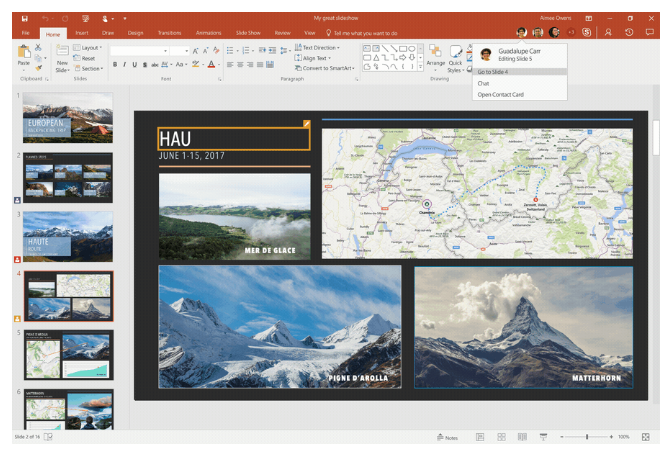
Microsoft Corp. has announced several new features to Office 365, including real-time co-authoring in PowerPoint, the ability to upload attachments to the cloud directly from Outlook and mobile notifications.
When it comes to productivity applications in the cloud, Office 365 is beating Google Inc.’s G Suite, according to a survey conducted by Bitglass Inc. Across more than 120,000 global organizations, Office 365 is deployed in nearly 35 percent of organizations while G Suite lags behind at 25 percent.
After launching five years ago, Microsoft Office 365 is now available in 150 markets across the world and is used by more than 1.2 billion people, according to the company.
When Microsoft launched Office 2016 in September last year there was a heavy focus on team collaboration, one such change was real-time co-authoring in Word, similar to what you can do in Google Docs.
Microsoft has now extended real-time co-author to PowerPoint on Windows desktop, allowing team members to collaborate on a presentation in real-time.
In November last year, as part of Office 2016, Microsoft introduced the ability to attach cloud-based documents, from OneDrive, SharePoint, etc., to an Outlook email.
Now Microsoft has introduced the ability to transform a traditional file attachment into a shared cloud document directly in the Outlook menu that you would use to attach the file. Team members will then receive a link to the file stored on OneDrive where they can download it.
Note: Location options may include OneDrive for your work account, OneDrive for your personal account and document libraries for various groups you belong to.
Microsoft is rolling out notifications on mobile devices so you will be alerted when there is activity on a shared cloud document. You will receive notifications when documents are shared and when documents are edited.
This feature is first rolling out to Office Insiders consumers for Word, Excel and PowerPoint on Android and Windows Mobile. The sharing and editing feature will roll out to consumers on iOS next month.
Word, Excel and PowerPoint now includes a “Shared with Me” tab, which will allow you to find and open documents that have been shared with you without leaving the app you are working in. The feature is available in Word, Excel and PowerPoint on Windows desktops and Macs for all Office 365 subscribers, as well as on iOS and Android.
In addition, Microsoft has also added a Recent Folders list in the Recent tab, allowing you to easily find and save files. The feature is available in Word, Excel and PowerPoint on Windows desktops for Office 365 subscribers in the Office Insider program.
Support our mission to keep content open and free by engaging with theCUBE community. Join theCUBE’s Alumni Trust Network, where technology leaders connect, share intelligence and create opportunities.
Founded by tech visionaries John Furrier and Dave Vellante, SiliconANGLE Media has built a dynamic ecosystem of industry-leading digital media brands that reach 15+ million elite tech professionals. Our new proprietary theCUBE AI Video Cloud is breaking ground in audience interaction, leveraging theCUBEai.com neural network to help technology companies make data-driven decisions and stay at the forefront of industry conversations.





