 APPS
APPS
APPS
APPS






APPS

A week after releasing Windows 10 Insider Preview Build 15014, Microsoft Corp. followed up with the release of Build 15019 on Friday.
The latest updates include various new gaming features, the ability for Microsoft Edge to read your ebooks aloud, improvements for its night light feature and more.
The latest Preview Build is only available to Windows Insiders in the Fast ring. Other users will have to wait for the Creators Update, which is due out in the spring.
After releasing Windows 10 Preview Build 15019, Microsoft identified two issues which were stopping insiders from installing the latest build.
The first issue is that insiders will receive an error, such as 0xC1900401, when trying to install the latest build. There is currently no workaround, but Microsoft is working on a fix.
With the second issue, the Windows Update says “initializing,” but nothing happens. To fix the issue, click the Start button > type “services” > open the Services panel > scroll down to Windows Update > right-click on Windows Update and click “stop”. Restart your PC > re-check for updates.
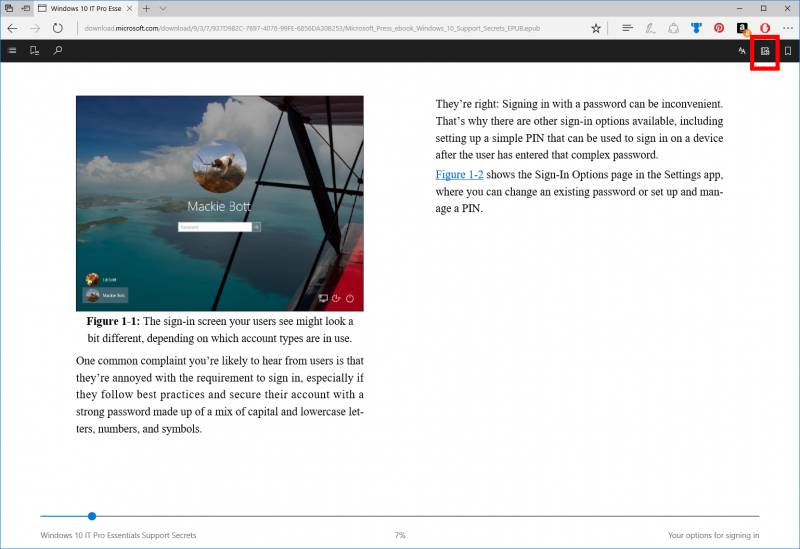
With Build 14971, Microsoft introduced the ability to read EPUB books in Edge, which was followed by the ability to purchase ebooks directly from the Windows Store with Build 15014.
Now Microsoft has announced that Edge can be used to read your ebooks aloud to users. Open an ebook in Microsoft Edge and then click the “read aloud” button in the top-right corner.
The Out-Of-Box-Experience has been improved with additional accessibility updates and privacy controls, these include Wi-Fi captive portal, updated design for Microsoft Account sign-in and sign-up, Windows Hello enrollment, Wi-Fi captive portal and more.
In the latest Preview Build, Microsoft has also made some updates to its “night light” feature. Changes include a name change from “blue light” to “night light,” the range of color temperatures has been improved and fixes for known issues.
Tip: To access the “night light” feature, go to Settings > System > Display.
Support our mission to keep content open and free by engaging with theCUBE community. Join theCUBE’s Alumni Trust Network, where technology leaders connect, share intelligence and create opportunities.
Founded by tech visionaries John Furrier and Dave Vellante, SiliconANGLE Media has built a dynamic ecosystem of industry-leading digital media brands that reach 15+ million elite tech professionals. Our new proprietary theCUBE AI Video Cloud is breaking ground in audience interaction, leveraging theCUBEai.com neural network to help technology companies make data-driven decisions and stay at the forefront of industry conversations.





