 APPS
APPS
APPS
APPS






APPS

Microsoft Corp.’s latest updates for Office 365 users includes improvements for PowerPoint and Word that make use of the company’s machine learning technology and advanced algorithms.
These updates follow various new improvements that Microsoft has made over the past month. They includes Cortana updates that allow the digital assistant to scan your emails and automatically generate reminders. While last month also saw the company launch various Office 365 security tools including Secure Score, Threat Intelligence and Advanced Data Governance.
Here’s a look at the latest updates for Office Insiders in the Fast ring:
Microsoft has added some enhancements to its machine learning-powered proofreader called Editor. Microsoft introduced Editor for Word last year, which provides advanced spell-checking features.
Editor will indicate incorrectly spelled words with a red squiggle and any grammar issues will be underlined with a double blue line. A gold dotted line will indicate any style issues such as wordiness or redundancy. Editor will also try and educate users by explaining why a certain word should be used rather than an alternative.
Editor makes use of Microsoft’s machine learning and natural-language processing technology.
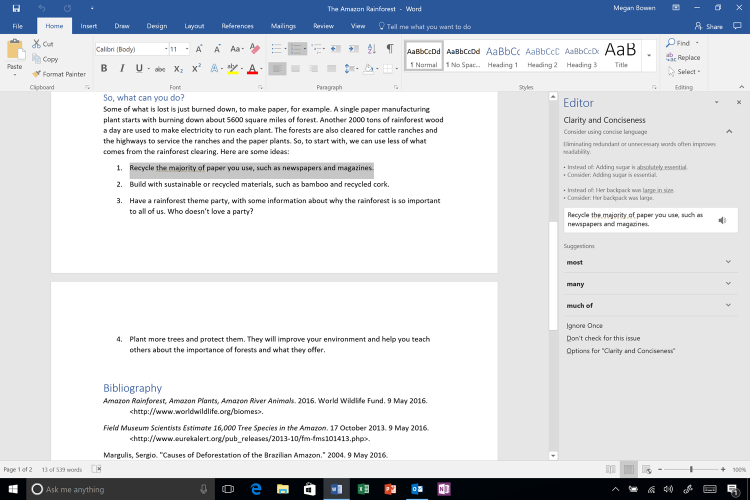
The new update introduces the Editor task pane to the side of the document, which replaces the “Spelling & Grammar” pane. Users will be able to see advanced spelling, grammar and writing style recommendations here with the ability to scan their entire document.
To access the new Editor pane, users can click on Spelling and Grammar under the Review tab. Alternatively, click the F7 key.
The Editor pane will also display when you right-click a word underlined in blue or gold. Users can either select a suggestion from the list or click the “See More” option to see additional detail in the Editor pane.
Gold-underlined words will appear in the pane under “Clarity and Conciseness” and will provide suggestions to replace a group of words with a single verb.
If there are words that a user misspells often they can right click the word > select “Add to AutoCorrect.”
The new Editor pane is now available for Office Insiders in the Fast ring.
QuickStarter in PowerPoint makes it easier to create a new presentation by creating a default set of slides for users. The feature was first announced at Microsoft’s Ignite Conference in September and is now available in PowerPoint 2016 for Office Insiders in the Fast ring.
In PowerPoint, select “QuickStarter” when selecting a template > type in your topic > QuickStarter will create a curated outline for your presentation > select your starter slides > select a theme for your presentation > click Create.
Your presentation outline will be created together with category recommendations of information to include, additional information that will require further research and associated Creative Commons images.
Support our mission to keep content open and free by engaging with theCUBE community. Join theCUBE’s Alumni Trust Network, where technology leaders connect, share intelligence and create opportunities.
Founded by tech visionaries John Furrier and Dave Vellante, SiliconANGLE Media has built a dynamic ecosystem of industry-leading digital media brands that reach 15+ million elite tech professionals. Our new proprietary theCUBE AI Video Cloud is breaking ground in audience interaction, leveraging theCUBEai.com neural network to help technology companies make data-driven decisions and stay at the forefront of industry conversations.





