 APPS
APPS
APPS
APPS






APPS

Slack Technologies Inc. has introduced the ability to add custom status updates and away messages to its business messaging app. The company is also opening up the feature to third-party developers.
As the enterprise messaging market gets more competitive with the likes of Microsoft Teams and Facebook Workplace, Slack has been introducing more feature updates to its app. Slack introduced drop-down message menus this week for third-party apps, allowing Slack bots to be more interactive with users. In February, Slack focused on large companies with the launch of its Enterprise Grid messaging platform. And earlier this year, it introduced threaded messages, a much sought-after feature.
Here’s a look at how to create your custom status and away messages:
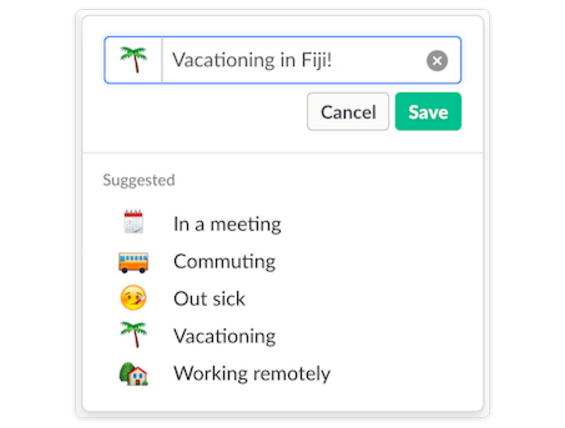
You can select from five default options, including in a meeting, commuting, out sick, vacationing and working remotely, which are all accompanied by a relevant emoji. If none of these work for your status update or away message you can create a custom version.
A custom status can be up to 100 characters long, together with a emoji of your choice. Custom status updates can be created in the browser, desktop and mobile versions (iOS or Android) of Slack. If you don’t select your own emoji, Slack will automatically use the speech balloon emoji to indicate to others that you have set a status.
To set a custom status on your computer, click your name in the upper-left corner > click “Set a status” > type your custom status and select an emoji.
To set a custom status on your mobile app, tap the “More items” icon (three dots) > tap “Set a status” > type your custom status and select an emoji. Alternatively, you can set your status directly from your profile.
Note: Your custom status will automatically change when you are in Slack voice and video calls.
Other team members will only see your status emoji displayed next to your name in the left sidebar and in messages. Hovering over the emoji will display your custom message.
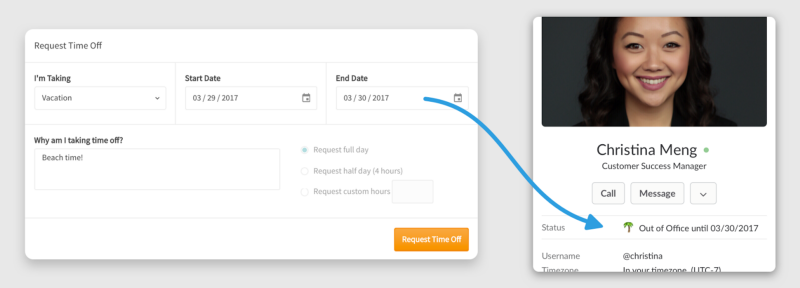
Third-party developers can also include custom status messages into their own apps.
In Slack’s blog post, the company mentions Zenefits, a leave tracking app, which will be able to sync your Slack status to its Time Off Tracking system to automatically change your status when you are on leave.
While the Meekan app, an artificial intelligence scheduling assistant, will automatically change your status when you are in a meeting and when you will be free.
Support our mission to keep content open and free by engaging with theCUBE community. Join theCUBE’s Alumni Trust Network, where technology leaders connect, share intelligence and create opportunities.
Founded by tech visionaries John Furrier and Dave Vellante, SiliconANGLE Media has built a dynamic ecosystem of industry-leading digital media brands that reach 15+ million elite tech professionals. Our new proprietary theCUBE AI Video Cloud is breaking ground in audience interaction, leveraging theCUBEai.com neural network to help technology companies make data-driven decisions and stay at the forefront of industry conversations.





