 APPS
APPS
APPS
APPS






APPS

Slack Technologies Inc. has launched a new Highlights feature in its enterprise messaging app that will call attention to a user’s most important messages.
The Highlights feature is the second major update from Slack’s Search Learning & Intelligence group, a team formed a year ago whose aim is to apply search and machine learning to build an intelligent layer on top of the messaging app. The new feature is currently only available on desktop for teams on Slack’s paid plans. Slack’s SLI team announced an artificial intelligence-powered search feature last month. The feature will surface a new “People & Channels” section at the top of search results that will contain team members and channels that have discussed the relevant search topic.
Slack has more than five million daily active users and more than 1.5 million paying customers, but a potential takeover of the enterprise messaging service could be nigh. News emerged today about a possible acquisition of the company by Amazon.com Inc. for an astounding $9 billion.
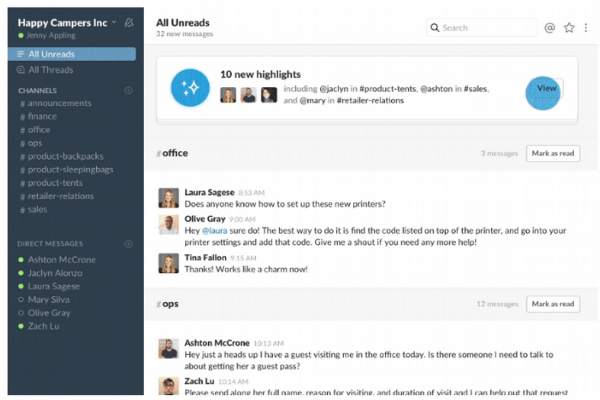
Highlighted messages will appear within the channels a user works in as well as being collated at the top of the “All Unreads” section. Highlights on desktop will roll out in the coming days to all teams on Slack’s paid plans and users will need to have the “All Unreads” feature enabled. Slack rolled out the “All Unreads” view in September for desktop users and will eventually come to the mobile apps.
To enable the “All Unreads” view > open the Team Menu > click Preferences > click Advanced > in the Channel List section, check the box next to “Turn on All Unreads.” Users can choose to sort their unread messages alphabetically, by newest or oldest activity. While teams on paid plans can also sort scientifically, which is tailored to how team members use Slack.
With the new Highlights feature, users will see up to 10 Highlights from across all their channels, displayed at the top of their “All Unreads” view. Each highlight will have a reason why Slack thought the message was relevant. You can dismiss a highlight if no action is required or click the highlight to jump directly to the channel where you can reply or react to the message.
Highlights are tailored to each individual team member and according to Slack will “become more personalized over time,” based on the team members and channels team members use most frequently. Users can also provide direct feedback to Slack using the thumbs up or down icons for each Highlight in order for the feature to become smarter.
Support our mission to keep content open and free by engaging with theCUBE community. Join theCUBE’s Alumni Trust Network, where technology leaders connect, share intelligence and create opportunities.
Founded by tech visionaries John Furrier and Dave Vellante, SiliconANGLE Media has built a dynamic ecosystem of industry-leading digital media brands that reach 15+ million elite tech professionals. Our new proprietary theCUBE AI Video Cloud is breaking ground in audience interaction, leveraging theCUBEai.com neural network to help technology companies make data-driven decisions and stay at the forefront of industry conversations.





