 APPS
APPS
APPS
APPS






APPS

Apple Inc. has updated its free video editing app that it introduced earlier this year. The latest version of Clips takes advantage of the TrueDepth camera sensors in the recently launched iPhone X and places users into animated, 360-degree landscapes.
Clips is a video editing app that allows users to combine video clips, photos and music into a single video, together with voice-based titles, music, filters and graphics that can then be shared on social media or directly with contacts.
Although Clips 2.0 does include some other new features like an updated user interface, iCloud support, new stickers and style transfer effects, the main new feature of Selfies Scenes will only be available for owners of Apple’s latest premium flagship device. The much-anticipated iPhone X went on sale on Nov. 3 and is expected to push Apple ahead of rival Samsung Electronics Co. Ltd. in worldwide smartphone market share.
Clips 2.0 is available as a free update from the App Store and is compatible with iPhone 5s, iPad Air and iPad mini 2 and later models, running iOS 11.1 and later. The new Selfie Scenes is only available for iPhone X users, while the style transfer effects are only available on iPhone 7 and later models and the 2017 iPad Pro.
Here’s a look at all the new features available in Clips 2.0:
If you are completely new to the Clips app, our in-depth guide provides all the necessary steps to get started with the video editing app. Next, head to the App Store and download or update your Clips app.
As the new Selfie Scenes feature makes use of the TrueDepth camera sensors you will need to have the flagship iPhone X to use it.
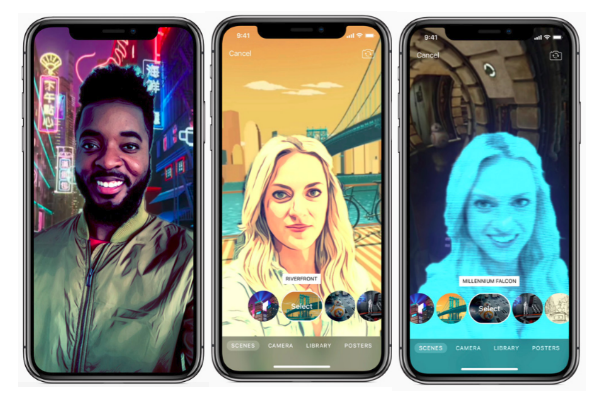
No matter where you are taking a selfie, the new Selfie Scenes mode will strip out the background behind you and allow you to replace it with one of 10 Apple-designed scenes. These scenes include different cities, landscapes, abstract paintings and even Millennium Falcon and Mega-Destroyer from “Star Wars: The Last Jedi.”
Each of the Selfie Scenes is a full 360-degree experience, surrounding users on all sides as they move the iPhone X around, plus they include environmental sound effects to make them more immersive. Once you have selected your background you can also decorate them with additional stickers and emojis.
Using the new Selfie Scenes is simply. Open the updated Clips app > select the Camera view and get ready to take the perfect selfie. Either take a photo or record a video, select a backdrop, add text, emojis, transfer effects, audio recordings and more until you are happy with the finished product.
Finally share your selfie on Facebook, Instagram, Vimeo or YouTube or directly with your friends.

Apple has also redesigned the UI for Clips to make it more streamlined and easier to navigate. The new design includes an Effects browser that gives users access to filters, labels, stickers and emojis. The labeled buttons feature makes it easier to edit Live Titles, edit filters, trim, mute and delete clips. When viewing their photo library or choosing an animated poster, the new full-screen browser allows users to see more of their content.
Clips 2.0 also includes artistic effects, which uses machine learning and style transfer technology to turn any photo or video in real time into a moody oil painting, vibrant watercolor or elegant pencil sketch.
New stickers in Clips include additional full-screen posters and stickers from Disney, as well as animated Star Wars stickers featuring Princess Leia, Luke Skywalker, Darth Vader, Chewbacca and others.
Clips 2.0 also includes 16 new Apple-designed stickers and 21 royalty-free soundtracks, which automatically adjust to the length of your video.
The Clips app now has support for iCloud. All Clips videos are automatically backed up to iCloud and users can then access and edit them on either their iPhone or iPad. With the addition of iCloud support, users can shoot a Clips video on their iPhone and then easily edit it on their iPad.
The Clips app has also added support for Shared iPad for environments like classrooms.
Support our mission to keep content open and free by engaging with theCUBE community. Join theCUBE’s Alumni Trust Network, where technology leaders connect, share intelligence and create opportunities.
Founded by tech visionaries John Furrier and Dave Vellante, SiliconANGLE Media has built a dynamic ecosystem of industry-leading digital media brands that reach 15+ million elite tech professionals. Our new proprietary theCUBE AI Video Cloud is breaking ground in audience interaction, leveraging theCUBEai.com neural network to help technology companies make data-driven decisions and stay at the forefront of industry conversations.





