



 APPS
APPS
APPS
APPS
APPS

Since Atlassian Corp. PLC first released Jira 16 years ago, the project management tool has become a fixture in software development initiatives. Today, the company is giving its flagship product a makeover to meet the needs of modern application teams.
The main theme of the update is accessibility. Actions that previously required knowledge of Jira’s query language or permission from the information technology department can now be done in a few clicks.
“The Jira Software you needed in 2002 isn’t the Jira Software you need today,” Atlassian co-Chief Executive Officer Scott Farquhar wrote in a blog post. “The workflows you built in 2010 aren’t the workflows you need today. That’s why our teams have totally reimagined the product to focus on making it easier to use and more powerful for modern software teams.”
The feature that Atlassian has revamped the most thoroughly is the board creator, which lets teams organize outstanding tasks in a list-based view made up of multiple columns. Users can now create new columns and move an item between existing ones with drag-and-drop controls. Plus, a simplified search interface makes it possible, without using custom queries, to find specific information such as what tasks were completed in the past week.
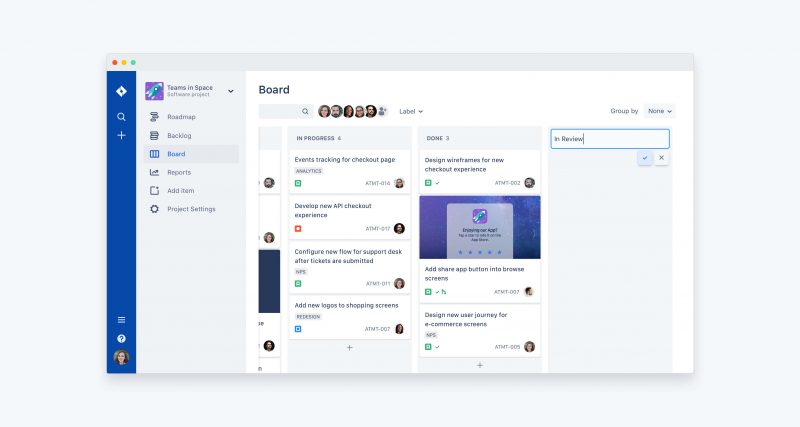
Many of the usability tweaks are inspired by the boards in Trello, the project management service that Atlassian acquired for $425 million last year. The company said that they’re designed in part to make Jira more accessible for nontechnical workers. Power users, in turn, have access to a revamped configuration mechanism that makes it possible to make advanced customizations to a board without the help of the information technology department.
Another part of Jira that’s getting an update is the issue view. That’s the part of the interface where developers can share and view detailed descriptions of software problems, which plays an outsized role since bug tracking is one of the tool’s main target use cases.
The update adds the ability to include attachments in issue entries, add navigation tags and create visual representations of important information. The idea is to make it simpler for developers to gain a full understanding of the bug they’re looking to troubleshoot. On the other hand, when a higher-level view is more appropriate, workers can use a new feature called Roadmaps to view outstanding tasks in a condensed chart.

Atlassian will continue to offer the previous interface as an option in Jira. That should give the millions of users who rely on the tool time to comfortably adjust to the changes, which at some point in the future will presumably be made the default view.
… We’d like to tell you about our mission and how you can help us fulfill it. SiliconANGLE Media Inc.’s business model is based on the intrinsic value of the content, not advertising. Unlike many online publications, we don’t have a paywall or run banner advertising, because we want to keep our journalism open, without influence or the need to chase traffic.The journalism, reporting and commentary on SiliconANGLE — along with live, unscripted video from our Silicon Valley studio and globe-trotting video teams at theCUBE — take a lot of hard work, time and money. Keeping the quality high requires the support of sponsors who are aligned with our vision of ad-free journalism content.
If you like the reporting, video interviews and other ad-free content here, please take a moment to check out a sample of the video content supported by our sponsors, tweet your support, and keep coming back to SiliconANGLE.






