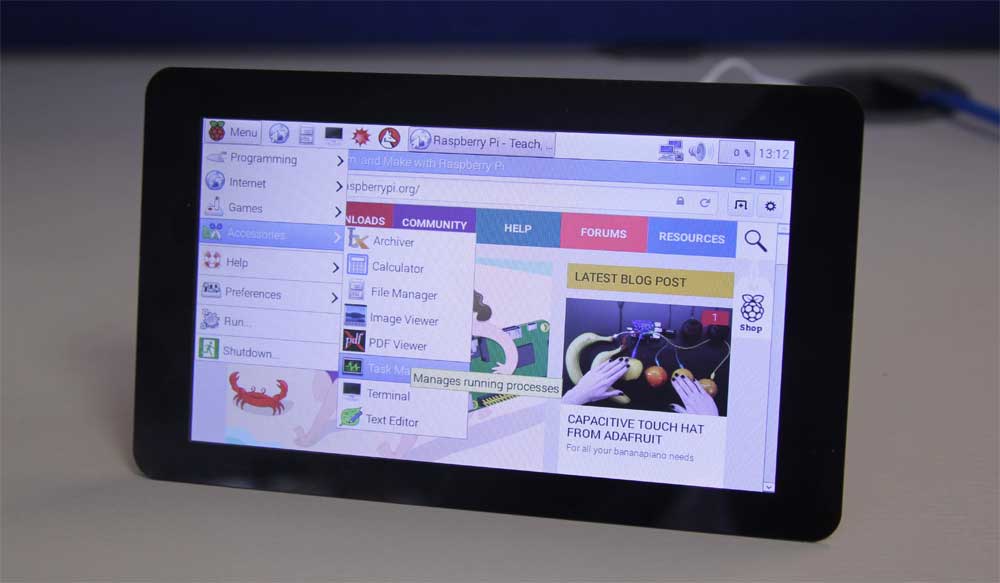





The official Raspberry Pi touch display is on sale now for $60 meaning that makers and developers with an interesting in hardware will have something to play with on the cheap today. The Raspberry Pi is a tiny computer made by the Raspberry Pi Foundation and the Raspberry Pi 2 Model B (based on the ARMv7 processor) only costs $35, making this computer cheap and easy for hardware developers to use as a test-bed for their projects.
The Raspberry Pi computer is a bare-bones low-power computer that comes with no peripherals, but can attach numerous input and output devices. It has a full HDMI (High-Definition Multimedia Interface) port so it can attach most modern monitors and TV sets for display and it also supports DPI (Display Parallel Interface), DSI (Display serial interface), and DBI (Display Bus Interface). The addition of the official touchscreen, at a mere $60, means that a lot of hardware developers now have a cheap way to attach touch interaction to their project.
To build the display, the Raspberry Pi Foundation went to Inelco Hunter based in the UK who made the display to fit some fine specs for the ‘industrial’ LCD touchscreen: GB 800×480 display at 60 frames per second, 24-bit colour, FT5406 10 point capacitive touchscreen, 70 degree viewing angle and a metal-backed display with mounting holes for the Pi.
The 7-inch touchscreen display will also be sold in the AdaFruit store for U.S. customers (Coming soon!)
The blog post announcing the official touchscreen display includes instructions for mounting and installing the screen on the Raspberry Pi.
The LCD display integrates with the Pi via a conversion board that screws on and has special connectors for linking it up. Powering it, however, is possible to power it with a separate uUSB power supply rated for at least 500mA, an an official 2A Raspberry Pi power supply via USB, or GPIO jumpers (supplied with the screen) for connecting to 5V and GND from the Pi.
The display drivers can be installed on the Pi via apt-get update and upgrade, the OS software on the Pi will automatically detect the screen and install the proper software.
As for a GUI to test the touch screen, the blog post suggests Kivy, a Python GUI development SDK for cross-platform applications and is designed to work with touchscreen devices (tablets and phones.)
Support our mission to keep content open and free by engaging with theCUBE community. Join theCUBE’s Alumni Trust Network, where technology leaders connect, share intelligence and create opportunities.
Founded by tech visionaries John Furrier and Dave Vellante, SiliconANGLE Media has built a dynamic ecosystem of industry-leading digital media brands that reach 15+ million elite tech professionals. Our new proprietary theCUBE AI Video Cloud is breaking ground in audience interaction, leveraging theCUBEai.com neural network to help technology companies make data-driven decisions and stay at the forefront of industry conversations.