







Google is rolling out a variety of changes for its 500 million+ Google Translate users. Changes include a new Tap to Translate feature for Android, Offline Mode for iOS users and Word Lens for Chinese.
You can get the updated versions of Google Translate for iOS from the App Store and for Android from the Play Store.
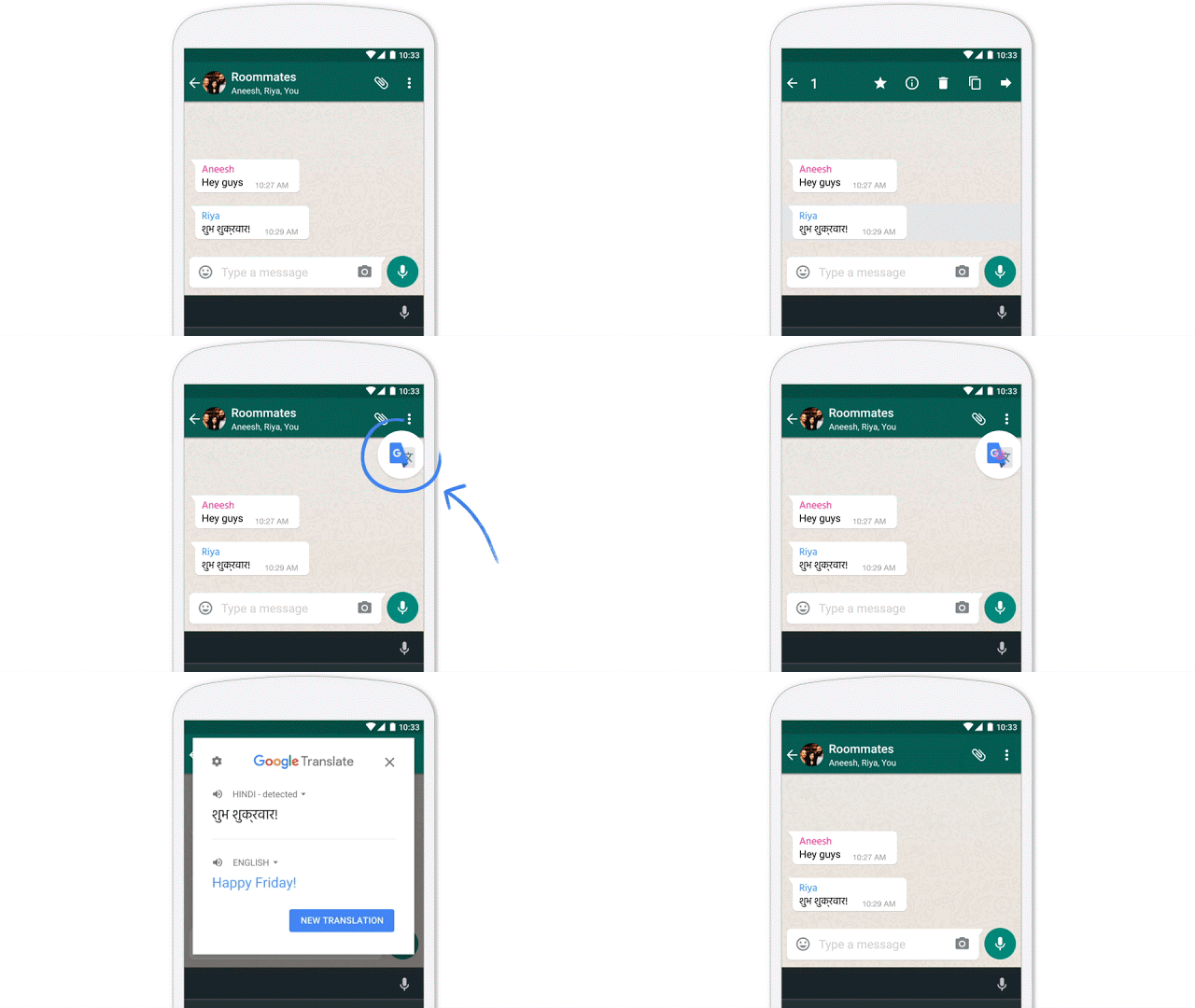
Google is rolling out a new feature that allows you to avoid the painstaking process of copying text out of an app, and pasting it into the Google Translate app to understand what it means. With Tap to Translate, that process happens directly in the app that you are using.
Simply copy the text you want to translate > tap the Google Translate icon and the translation will pop-up directly in the app. The new feature works in a variety of apps, including WhatsApp, Line, Gmail, YouTube, and more. It is available for all of Google Translate’s 103 languages and will even work if you are offline.
The Tap to Translate feature is currently only available for Android users and your smartphone will need to be running Jellybean 4.2 and above.

iOS users will now be able to translate on the go, whether they have an internet connection or not, with the introduction of Offline Mode. In addition, both iOS and Android users will be able to download smaller offline language packages, which have been shrunk to 25 MB each, 90 percent smaller than previous packages.
To download languages to use offline, open the Google Translate app on your iOS or Android device > tap the down arrow next to the languages at the top of the screen > scroll down to the language you want to download > tap the download button next to the language. If there is no download button then the language is not available in Offline Mode.
Alternatively, open the Google Translate app > Menu > Settings > Offline languages > find the language > tap the download button.
With the addition of a Filipino language pack, you are now able to download 52 languages to use in Offline Mode.

The final update for Google Translate is Word Lens for Chinese. You can now instantly translate menus, packages, signs and more from Chinese to English and visa verse. It works for both simplified and traditional Chinese and like the other 28 Word Lens languages it also works if you are offline.
To use Word Lens, open the Google Translate app > tap the camera button in the app > point your camera at the words you want to translate and the translated text will appear on your device’s screen.
Support our mission to keep content open and free by engaging with theCUBE community. Join theCUBE’s Alumni Trust Network, where technology leaders connect, share intelligence and create opportunities.
Founded by tech visionaries John Furrier and Dave Vellante, SiliconANGLE Media has built a dynamic ecosystem of industry-leading digital media brands that reach 15+ million elite tech professionals. Our new proprietary theCUBE AI Video Cloud is breaking ground in audience interaction, leveraging theCUBEai.com neural network to help technology companies make data-driven decisions and stay at the forefront of industry conversations.





