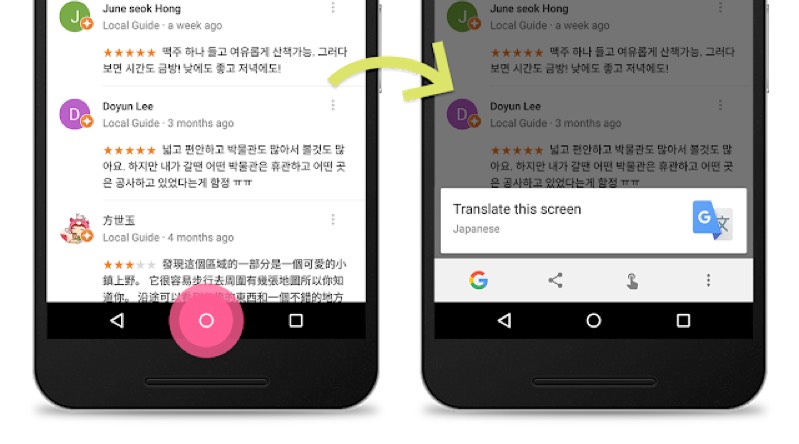







Google, Inc. has updated its Android Google Now on Tap feature with three new functions including the ability to translate text on any page, a new built-in Discover mode, and the ability to scan barcodes and QR codes.
Now on Tap, available for Android phones running Marshmallow 6.0 and above, first launched one month ago offering the ability to find information on text or a photograph, for example, users could take a picture then use the service to find information on what was in the picture itself.
The new translate feature will be the most useful of the additional features.
Now on Tap can translate text on any screen, whether it’s an app or web page, whereas previously users were only able to translate a page directly from Google Chrome.
“If you’re using Google Maps and come across a location or a restaurant review in a foreign language, just long press the home button and continue reading,” the Google Inside Search blog explained. “You’ll even be able to translate multiple languages at once.”
Initially, the translate feature is currently available for phones with the language set to English, French, Italian, German, Spanish, Portuguese and Russian, although seemingly will be able to translate from any language currently supported by Google Translate.
The Now on Tap Discover mode now provides additional information when you tap the Discover icon; users now receive a stream of visual content related to what is on their screen, in addition to the previous explanatory information
Google gives the example of a user reading an article about Pluto, adding that “if you are interested in learning about NASA, Discover mode will show you a stream of links to YouTube videos, news articles, and more.”
Last but not least is the addition of barcode and QR code scanning.
Under the feature users can simply point their camera at a barcode or QR code and obtain helpful cards related to the object the code appears on such as user reviews; the feature is said to work with packaged products, books, DVDs and “more!”
Google Now on Tap is still fairly new so it’s hard to gauge if many people are using it, but in theory it’s a handy service that has now become even more useful.
To access Now on Tap on your Android phone (again, only phones running Marshmallow 6.0 or later) hold down the home button on any screen, and the options pop up.
It’s not clear at the time of writing whether the new features are available to all Android 6.0 users immediately or is in the process of being rolled out.
Support our mission to keep content open and free by engaging with theCUBE community. Join theCUBE’s Alumni Trust Network, where technology leaders connect, share intelligence and create opportunities.
Founded by tech visionaries John Furrier and Dave Vellante, SiliconANGLE Media has built a dynamic ecosystem of industry-leading digital media brands that reach 15+ million elite tech professionals. Our new proprietary theCUBE AI Video Cloud is breaking ground in audience interaction, leveraging theCUBEai.com neural network to help technology companies make data-driven decisions and stay at the forefront of industry conversations.





