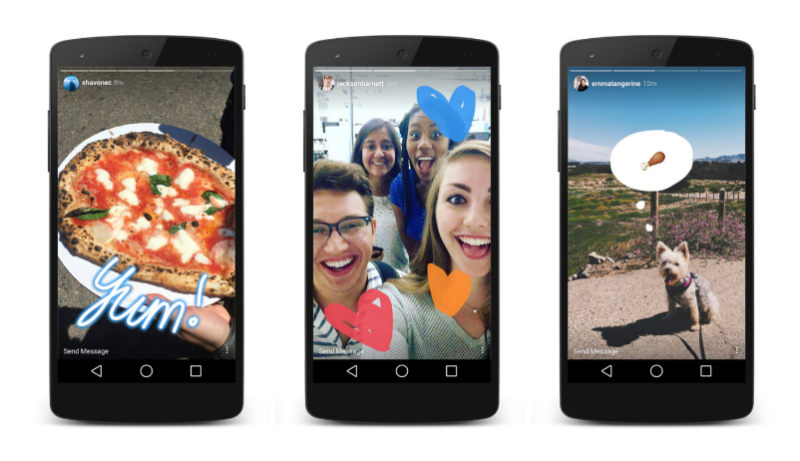







Facebook Inc.-owned Instagram has taken a leaf out of Snapchat Inc.’s book with the introduction of a new feature called Stories.
The feature allows Instagram users to post photos and videos throughout the day, which appear in a slideshow format. You can edit your photos with a variety of text and drawing tools and all photos and videos disappear after 24 hours. The new feature sounds very similar to Snapchat’s My Story feature.
Here’s a look at how the new Instagram Stories feature will work.
Make sure you have the latest Instagram app for Android or iOS installed on your device. The new feature is rolling out over the next few weeks.
In the top-left corner tap, the ‘+’ icon or swipe left in your feed. To take a photo, tap the circle button or tap and hold it for video. To upload a photo or video, swipe down on the screen and choose the one you want to upload.
Before uploading, you can edit the photo or video with text or add drawings by tapping the pen icon. To save your story, tap Done. To share your story, tap the checkmark button.
The photos and videos will only remain on Instagram for 24 hours, after which they will disappear.
If there are any photos or videos you want to delete before the 24-hour cutoff, select the relevant photo or video > tap the More icon (three dots) > tap Delete.
On the other hand, if you want to save your story before it disappears, select the story > tap the More icon > tap Save Photo.
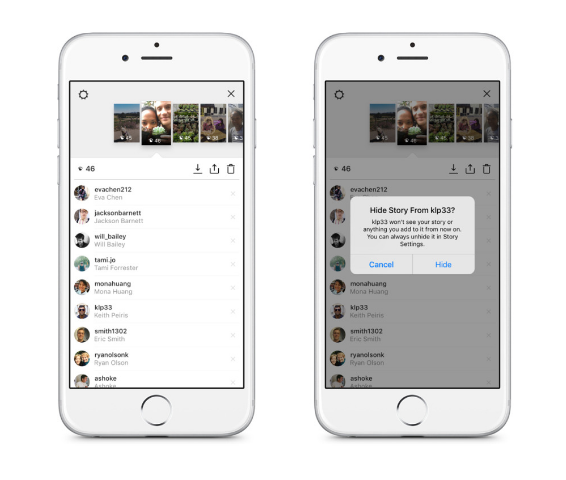
If you do not want certain followers seeing some of your more outrageous stories, you can hide your story from them. In the top right, tap the More icon (Android) or sun icon (iOS) > Story Settings > Hide My Story From > select the person(s) from the list > tap Done.
A bar at the top of your Instagram feed will show the stories from the people you follow. When they add a new story, there will be a colorful ring around their profile photo. Tap the profile photo and you can view their story.
You will be able to see how many people have viewed your story, by swiping up on the screen. You will see a view counter and the names of your followers who have viewed it.
Sources: Cnet; Instagram Help Center
Support our mission to keep content open and free by engaging with theCUBE community. Join theCUBE’s Alumni Trust Network, where technology leaders connect, share intelligence and create opportunities.
Founded by tech visionaries John Furrier and Dave Vellante, SiliconANGLE Media has built a dynamic ecosystem of industry-leading digital media brands that reach 15+ million elite tech professionals. Our new proprietary theCUBE AI Video Cloud is breaking ground in audience interaction, leveraging theCUBEai.com neural network to help technology companies make data-driven decisions and stay at the forefront of industry conversations.





