 APPS
APPS
APPS
APPS






APPS

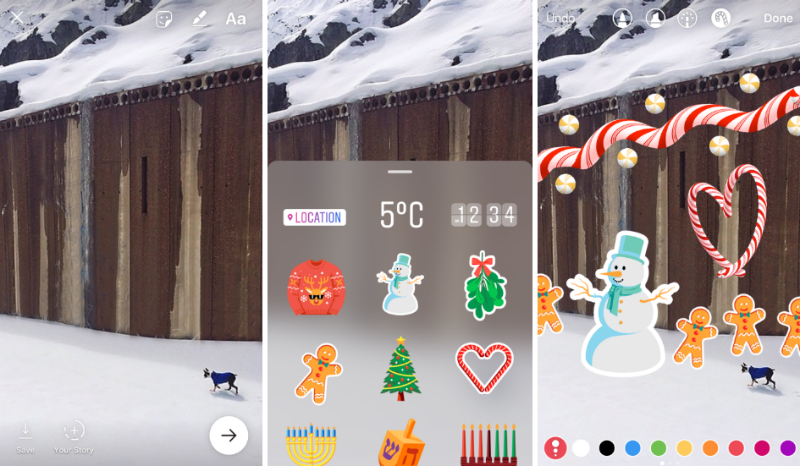
Facebook Inc.-owned Instagram introduced Stories in August, a feature very similar to Snapchat’s My Story feature. Now Instagram Stories is becoming more of a Snapchat clone with the introduction of customizable stickers based on a person’s location, as well as holiday-specific stickers.
Instagram Stories allows users to post photos and videos throughout the day, which appear in a slideshow format. The photos and videos can be edited with a variety of text and drawing tools and all uploaded content disappears after 24 hours.
As part of the latest update for Instagram Stories, the company is also introducing a new “hands-free” recording option, a feature not yet offered by Snapchat.
Here’s a look at the new features for Instagram Stories, including holiday and customizable stickers, a “hands-free” recording option and the ability to download your entire story on iOS:
Available just in time for the festive season, Instagram Stories has introduced a variety of holiday stickers that will be available for the next few weeks. Instagram has also added a new drawing tool for the festive season called the candy cane brush. Additional stickers will be launched in time to ring in the new year while more permanent stickers will arrive in 2017.
Parent company Facebook has also introduced some festive cheer. In their News Feed, users will see a message from Facebook inviting them to share a holiday card with their friends. On the message, tap “Select a Card” > select a card from the 18 custom-designed cards > tap Post.
In Instagram Stories you can add context to your photo or video by adding customizable stickers for the weather, current time and even your location.
To add customizable stickers, take a photo or video > tap the new stickers icon (smiley face) next to the text and drawing icons > select from the customizable stickers, including weather-, time- and location-specific stickers. The stickers, which are available in a variety of different styles, can be moved around and be made bigger or smaller.
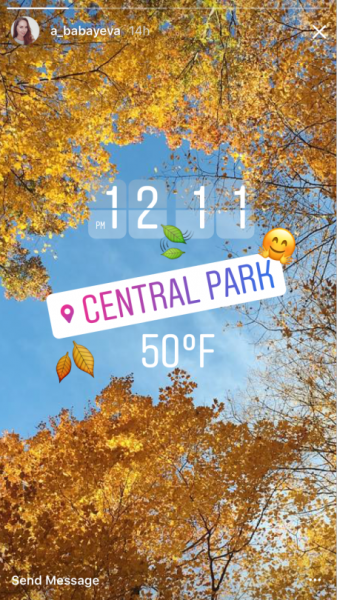
Note: Adding a location sticker will work in the same way as when you add a location to a shared Instagram post. Followers watching your Instagram Story will be able to tap the sticker to learn more about the specific location.
When recording videos, users will no longer need to press and hold to record. Instagram has introduced the new “hands-free” mode that will allow users to start a recording with a single tap of the button.
Instagram has also introduced the ability to add unlimited text to your photo or video. Simply keep tapping the text button to add more and select its alignment. A new slider will also allow you to easily adjust text size and it also allows for automatic text wrapping.
On iOS, you can now download your entire story from the past 24 hours into a single video that will be saved to your camera roll. Open the story > swipe up on the screen > tap the download button (arrow in a circle) in the top right.
Support our mission to keep content open and free by engaging with theCUBE community. Join theCUBE’s Alumni Trust Network, where technology leaders connect, share intelligence and create opportunities.
Founded by tech visionaries John Furrier and Dave Vellante, SiliconANGLE Media has built a dynamic ecosystem of industry-leading digital media brands that reach 15+ million elite tech professionals. Our new proprietary theCUBE AI Video Cloud is breaking ground in audience interaction, leveraging theCUBEai.com neural network to help technology companies make data-driven decisions and stay at the forefront of industry conversations.





