 APPS
APPS
APPS
APPS






APPS

Burner, the app from California-based Ad Hoc Labs Inc., has launched a variety of new features.
They include a new integration with automation tool Zapier Inc., a public application programming interface with support for OAuth 2.0 and a chatbot called Hostbot that allows automated communication between guests and short-term rental hosts.
The Burner app allows users to create an unlimited amount of disposable phone numbers that can be used for calling, texting and picture messaging. Here’s a look at the latest updates for Burner:
Burner’s API for developers is now open to the public, which will allow native integration of Burners, Contacts and Messages without the need for advanced training to program webhooks.
Developers will now have access to set or toggle features on an authorized Burner line, including the ringer, notifications and auto-reply messages.
The public API also includes support for OAuth 2.0, which will allow developers to integrate Burner’s smart number capabilities directly into their applications.
Users have been able to use Burner with Zapier since the company launched its developer program last year. Thanks to Burner’s new support for OAuth, all users can now create Triggers or “Zaps” and connect with various supported apps, with no developer experience needed.
Zaps will allow users to connect their Burner number to other apps, including Google Calendar, Trello, customer relationship management systems, customer support tools, social networks and more.
Log into Zapier or sign up for an account > at the top of your Zapier Dashboard, click “Make a Zap” > under “Choose a Trigger App” select the relevant app that you want to use as the Trigger > authorize the selected app > select “Burner” under “Choose an Action App” > authorize Burner > select either “Configure Burner” or “Create Outbound Text.”
If you select “Configure Burner,” choose the Burner number to use with this Action. You will be able to control the ringer, notifications and auto-reply to texts.
If you select “Create Outbound Text,” choose the Burner > pick a number, text and image (optional) for the outbound text for this Zap.
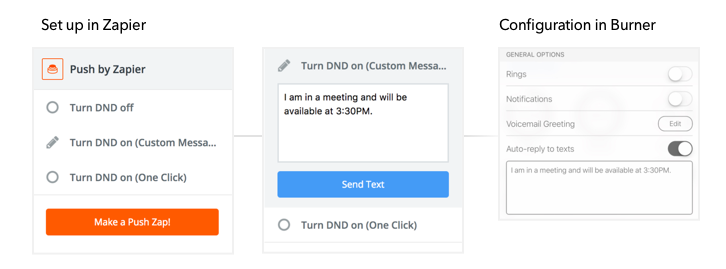
Examples of Zaps include:
To showcase the capabilities of Burner’s new API with OAuth, the company has launched Hostbot, a chatbot that automates communication between short-term rental hosts and their guests.
To get started, users will authorize Hostbot > attach it to a Burner > answer 16 frequently asked questions.
When a guest sends a question to the specific Burner number, the system will use natural language processing and automatically send back an answer. If Hostbot doesn’t know the answer to a question, the text will be routed to the host.
Burner based its 16 questions on its research of commonly asked questions on platforms like Airbnb Inc., Homeaway Inc. and VRBO.com Inc.
Source: Burner
Support our mission to keep content open and free by engaging with theCUBE community. Join theCUBE’s Alumni Trust Network, where technology leaders connect, share intelligence and create opportunities.
Founded by tech visionaries John Furrier and Dave Vellante, SiliconANGLE Media has built a dynamic ecosystem of industry-leading digital media brands that reach 15+ million elite tech professionals. Our new proprietary theCUBE AI Video Cloud is breaking ground in audience interaction, leveraging theCUBEai.com neural network to help technology companies make data-driven decisions and stay at the forefront of industry conversations.





