 APPS
APPS
APPS
APPS






APPS

Microsoft Corp. has unveiled an opt-in beta version of its redesigned Outlook.com that offers users access to a faster and more personalized email experience.
The aim of the beta, launched Tuesday, is for users to test out the features below and based on feedback Microsoft plans to introduce certain features into Outlook.com. The new redesign hasn’t rolled out to Outlook Calendar, People or Tasks, but this will take place over the next few months, in addition to the rollout of more Outlook.com beta enhancements.
Here’s a look at how to opt into the Outlook.com beta and the features you can expect to enjoy:
Microsoft is rolling out the opt-in beta in stages and it will be a few weeks before all Outlook users have the option to opt in. According to Microsoft, Outlook.com Premium customers don’t currently have access to beta, but this will be available at a later date.
If the beta is available for you, you will see a “Try the beta” toggle switch, which will appear in the top-right corner of your inbox the next time in login. Toggle the switch to access the beta. You can always revert to the regular Outlook.com by sliding the toggle switch again, to switch off the beta.
If you don’t have access the beta yet or are a Premium customer, The Verge has spotted a workaround, which will allow all users to try it out.
If you are eager to test out the beta, open up Outlook.com > sign into your account > change the URL in the address bar from https://outlook.live.com/owa to https://outlook.live.com/mail/#/inbox > you will then see and be able to enable the “Try the beta” toggle.
Note: This workaround won’t stick once you reload Outlook.
Inspired by the Outlook Mail app in Windows 10, the Outlook.com beta has a new design, which includes iconography from Windows 10 and a hamburger menu.
Microsoft states that its new web development framework allows for a more responsive and modern design. According to TechCrunch, to achieve this new framework, Microsoft is using Facebook Inc.’s ReactJS.
The new design also includes an upgraded search, which will preview files and photos directly in the conversation list.
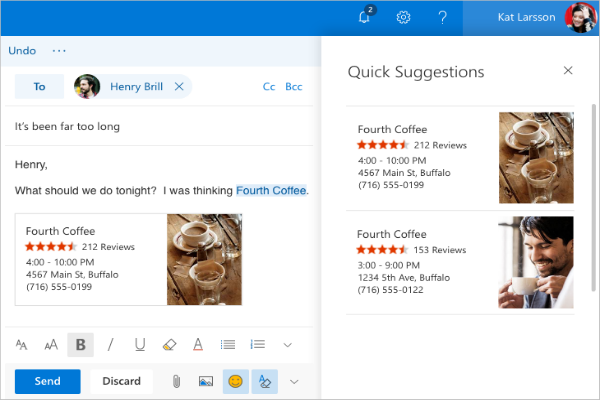
The Quick Suggestions feature will intelligently provide suggestions based on what you are writing in your email. Suggestions can include flight information, restaurant reservations, business details, etc., which you can easily add to your email response.
An improved photo experience in the Outlook.com beta places all your photos sent or received via email in one place.
The search functionality allows you to search for specific photos or photos from a single contact, but is pretty limited at this stage and doesn’t include any intelligent features so you will need to search for the exact file or email name. Microsoft will hopefully look at including more advanced search features, like the ones found in OneDrive and Google Photos.
Outlook.com beta’s new personalization options allow you to pin emails from specific contacts to your shortcuts sidebar.
Microsoft has also added the new Expressions feature, which will give users access to a variety of emojis and GIFs that can be included in their email replies.
You can provide feedback or vote on submitted ideas through UserVoice.
Support our mission to keep content open and free by engaging with theCUBE community. Join theCUBE’s Alumni Trust Network, where technology leaders connect, share intelligence and create opportunities.
Founded by tech visionaries John Furrier and Dave Vellante, SiliconANGLE Media has built a dynamic ecosystem of industry-leading digital media brands that reach 15+ million elite tech professionals. Our new proprietary theCUBE AI Video Cloud is breaking ground in audience interaction, leveraging theCUBEai.com neural network to help technology companies make data-driven decisions and stay at the forefront of industry conversations.





