 APPS
APPS
APPS
APPS






APPS

Google LLC announced the launch Wednesday of its new Drive File Stream for all enterprise G Suite customers.
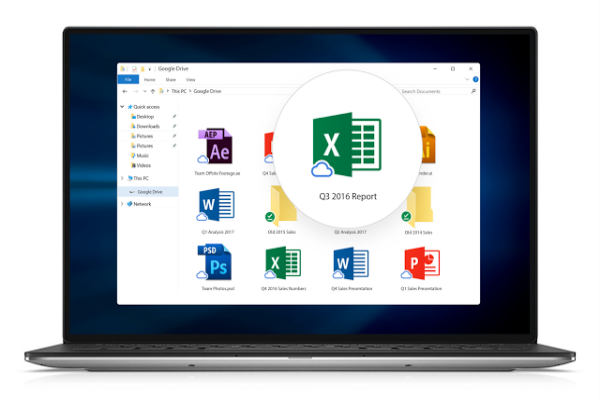
Drive File Stream, which was offered to early adopters in March, is the enterprise version of Google’s Backup and Sync tool introduced for consumers in July. The main difference between the tools is that Drive File Stream does not store data locally. Rather, Google Drive files are streamed on demand and are only downloaded once opened.
Drive File Stream replaces Google Drive for Mac/PC. It will no longer be supported from Dec. 11 and will completely shut down on March 12. Users of Google Drive for Mac/PC will start seeing warning messages from October about the replacement.
While Drive File Stream will only become generally available to all users on Sept. 26, it can be enabled by administrators starting today.
Drive File System allows users to stream My Drive and Team Drive files directly from the cloud to a Mac or personal computer, which frees up disk space and network bandwidth. The amount of company data stored on a user’s hard drive is reduced substantially and as files are stored in the cloud, any changes made are automatically updated in all places.
With Drive File Stream, users can also make specific Drive files available for offline access.

To use Drive File Stream, you will need Windows 7 or higher, while Mac users will need El Capitan (10.11) or higher.
Sign into your Google Admin Console using your administrator account > click Apps > G Suite > Drive and Docs > Data Access > select the desired organizational unit if you have the G Suite Enterprise, Business, Education or Nonprofits edition.
To enable Drive File Stream, check “Allow Drive File Stream in your organization.” If you want users to have access to the download link, check “Show Drive File Stream download link in the Drive interface,” alternatively, don’t check this option if you plan to deploy Drive File Stream as the administrator.
Note: It is possible for a user can run Drive File Stream and Backup and Sync on the same machine, but in order to save disk space, they’ll be prompted to stop syncing My Drive with Backup and Sync.
When the tool becomes available on Sept. 26, you can either allow all users to install Drive File Stream on their own machines or as the administrator you can deploy it in silent mode using the .exe file for Windows or Mac. Follow the instructions on the Google support page.
Support our mission to keep content open and free by engaging with theCUBE community. Join theCUBE’s Alumni Trust Network, where technology leaders connect, share intelligence and create opportunities.
Founded by tech visionaries John Furrier and Dave Vellante, SiliconANGLE Media has built a dynamic ecosystem of industry-leading digital media brands that reach 15+ million elite tech professionals. Our new proprietary theCUBE AI Video Cloud is breaking ground in audience interaction, leveraging theCUBEai.com neural network to help technology companies make data-driven decisions and stay at the forefront of industry conversations.





