 APPS
APPS
APPS
APPS






APPS

In its attempt to keep users inside its app, Facebook Inc. has launched a “food order” feature for U.S. users.
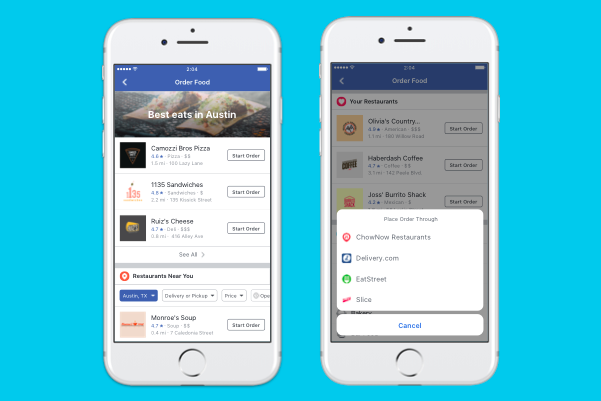
Unlike similar services like UberEATS, Facebook’s Order Food service will act as a middleman rather than a delivery service. It will utilize partnerships with existing delivery services, like Delivery.com, DoorDash, ChowNow, Zuppler, EatStreet, Slice and Olo who will complete the order that users initiate through the Facebook app.
In addition to being able to order food from local restaurants that take deliveries through these services, Facebook users will also be able to order food directly from certain restaurants, including Papa John’s, Wingstop, Panera, Jack in the Box, TGI Friday’s, Denny’s, El Pollo Loco, Chipotle, Five Guys and Jimmy John’s.
This year has seen Facebook roll out other features that keep users within the app. Earlier this year, Facebook rolled out the ability for businesses in the U.S. and Canada to post job openings. Facebook users can then apply directly for these jobs via the app. A new Movies section was discovered last month that allows Facebook users to see the movies playing nearby, available showtimes and the ability to purchase a ticket.
Facebook confirmed that the new Order Food feature has been in testing for over a year. TechCrunch discovered a test version of the feature back in May. A year ago, Facebook also introduced the ability for restaurants to add an order button to their Facebook Pages if using Delivery.com or Slice, which users tap to place food orders.
The new Order Food feature is rolling out to all users in the U.S. on Android, iOS and desktop.
To get access to the new Order Food feature on Facebook, you will need to be in the U.S. and will have to update to the latest iOS or Android app. You can also order via the desktop app.
In the Facebook app, go to the Explore menu > click or tap the new “Order Food” option. You will see a list of restaurants in your area that offer pickup or delivery services. When you have decided on a restaurant, click or tap the “Start Order” button next to the relevant restaurant’s name. To help make your restaurant selection easier, you will also be able to read reviews about the relevant restaurant from your Facebook friends.
You will be directed to the food delivery service for that restaurant (Delivery.com, DoorDash, ChowNow, Zuppler, EatStreet, Slice or Olo). You can use your existing login details with these delivery services or if you don’t have an account with the relevant delivery service you will be prompted to create one.
Support our mission to keep content open and free by engaging with theCUBE community. Join theCUBE’s Alumni Trust Network, where technology leaders connect, share intelligence and create opportunities.
Founded by tech visionaries John Furrier and Dave Vellante, SiliconANGLE Media has built a dynamic ecosystem of industry-leading digital media brands that reach 15+ million elite tech professionals. Our new proprietary theCUBE AI Video Cloud is breaking ground in audience interaction, leveraging theCUBEai.com neural network to help technology companies make data-driven decisions and stay at the forefront of industry conversations.





