 APPS
APPS
APPS
APPS






APPS

Google LLC Monday launched three new photography apps, part of the company’s new “appsperiments” program.
The new apps are called Storyboard, Selfissimo! and Scrubbies and, according to Google, they’re the first installment of mobile photography experiences that are built on experimental technology.
The “appsperiments” program is inspired by Google’s Motion Stills app, introduced last year, which provides video stabilization for Apple Inc.’s Live Photos. The three new apps and future ones rely on technologies in development at Google, including object recognition, person segmentation, stylization algorithms, efficient image encoding and decoding technologies.
Here’s a look at the three new photography apps from Google:
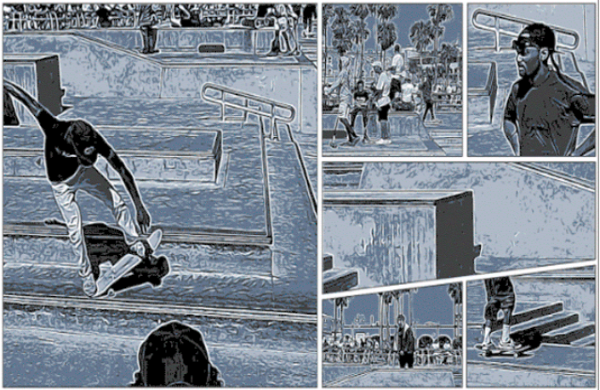
Currently only available for Android, Storyboard (pictured above) will take a video on your device and transform it into a single-page comic layout. Storyboard will automatically select interesting frames from the video, apply one of six visual styles and lay them out as a single page comic.
The app is very similar to photo-editing app Prisma, developed by Prisma Labs Inc., which recently shifted focus to businesses.
To use Storyboard, download the app from the Play Store > open the Storyboard app > tap “Load Video” > select a video from your device’s library. The app will process the video, select the relevant frames and select a style. Pull down to refresh the screen until you are happy with the style.
Tap on the screen and you will be given the options to Load Video, Save or Share. The Load Video option will allow you to try the Storyboard app out on a new video. Saving the comic layout will save it to your device’s gallery, while you will be able to share it on Facebook, WhatsApp, Messenger, Skype, email and more.

Available on Android and iOS, as the name suggests Selfissimo! is for the lovers of selfies out there. The Selfissimo! app acts as your selfie photographer; every time you strike a pose, it will take a photo. Once you are tired of posing, you will be left with a contact sheet of photos, currently only available in black and white.
To use Selfissimo! download the app from the Play Store or App Store > open the app and start a photo shoot. The app will take a photo each time you change poses or move the phone slightly to trigger the next photo. You can end the photo shoot by tapping on the screen and either save or share individual photos or the entire photo shoot.
Currently only available for iOS, Scrubbies allows you to change the speed and direction of video playback to create looping videos. Google describes the Scrubbies process as “scratching it like a DJ.”
To use Scrubbies, download the app from the App Store > open the app and shoot a video containing interesting motion. Once the video is complete, swipe it with one finger to play it back. Swipe back and forwards on the video to “remix” it. Swipe the video with two fingers to record the playback.
The footage is automatically saved in the gallery and you can share the looping video on the usual platforms.
Support our mission to keep content open and free by engaging with theCUBE community. Join theCUBE’s Alumni Trust Network, where technology leaders connect, share intelligence and create opportunities.
Founded by tech visionaries John Furrier and Dave Vellante, SiliconANGLE Media has built a dynamic ecosystem of industry-leading digital media brands that reach 15+ million elite tech professionals. Our new proprietary theCUBE AI Video Cloud is breaking ground in audience interaction, leveraging theCUBEai.com neural network to help technology companies make data-driven decisions and stay at the forefront of industry conversations.





