 APPS
APPS
APPS
APPS






APPS

Cloud services have become Microsoft Corp.’s most important source of revenue growth, as its better-than-expected earnings report on Thursday demonstrated. But the company is still as committed as ever to advancing Windows 10.
Microsoft today announced that the next major upgrade to the personal computer operating system will become available for manual download on Monday, with a full rollout set to follow on May 8. The release will bring a raft of new features for both users and enterprise administrators.
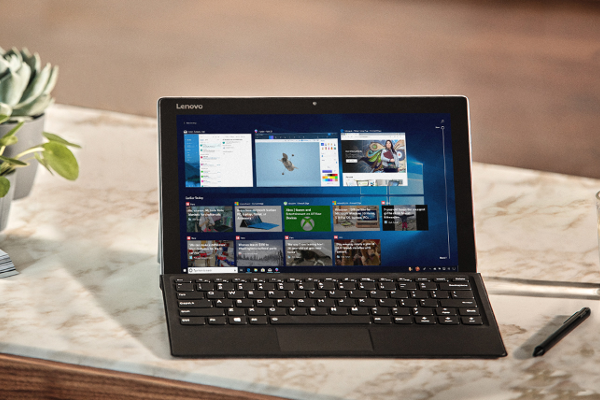
The headline feature in the release, which Microsoft refers to simply as the Windows 10 April 2018 Update, is Timeline. It’s an augmented version of the Task View that enables users quickly to resume any activities they’ve started in the past 30 days. Timeline displays all the files and web pages that have been accessed on the PC in this time frame, as well as activity from any mobile devices that users may choose to add.
Timeline is joined by a number of features designed to reduce distractions in Windows 10. The most significant, called Focus Assist, enables users have the operating system mute notifications at specific times, such as when they’re working.
Alongside Focus Assistant, Microsoft will release a complementary mute feature for Edge to let users silence tabs. The capability is part of an entirely new version of the browser that is also set to bring several usability improvements. Perhaps the most notable of them is a full-screen reading view that, continuing the theme of the update, aim to create a more distraction-free environment for viewing documents.
On top of the new features for end-users, the upgrade will also bring several enhancements designed to help companies better manage and secure employees’ devices.
One item that stands out is the addition of support for S Mode to Windows 10 Enterprise. S Mode, which was originally a standalone version of the operating system for schools, only allows users to download software from their organizations’ internal app store. The result is a significant reduction in the risk of workers unwittingly installing malware.
The support for S Mode is joined by, among other things, new configuration options designed to help companies make better use of Windows 10’s Delivery Optimization mechanism. The tool lets a Windows device distributed operating system updates to other endpoints on a company’s network that have yet to be refreshed. The process is much faster than a regular download, which Microsoft said can speed patching for companies with a lot of hardware to update.
All the new administrative features will become available as part of the company’s Microsoft 365 bundles. The subscription-based plans combine Windows 10 with Office 365 and a number of other Microsoft products that vary based on the package into a single, integrated offering.
Support our mission to keep content open and free by engaging with theCUBE community. Join theCUBE’s Alumni Trust Network, where technology leaders connect, share intelligence and create opportunities.
Founded by tech visionaries John Furrier and Dave Vellante, SiliconANGLE Media has built a dynamic ecosystem of industry-leading digital media brands that reach 15+ million elite tech professionals. Our new proprietary theCUBE AI Video Cloud is breaking ground in audience interaction, leveraging theCUBEai.com neural network to help technology companies make data-driven decisions and stay at the forefront of industry conversations.





